Font Manager#
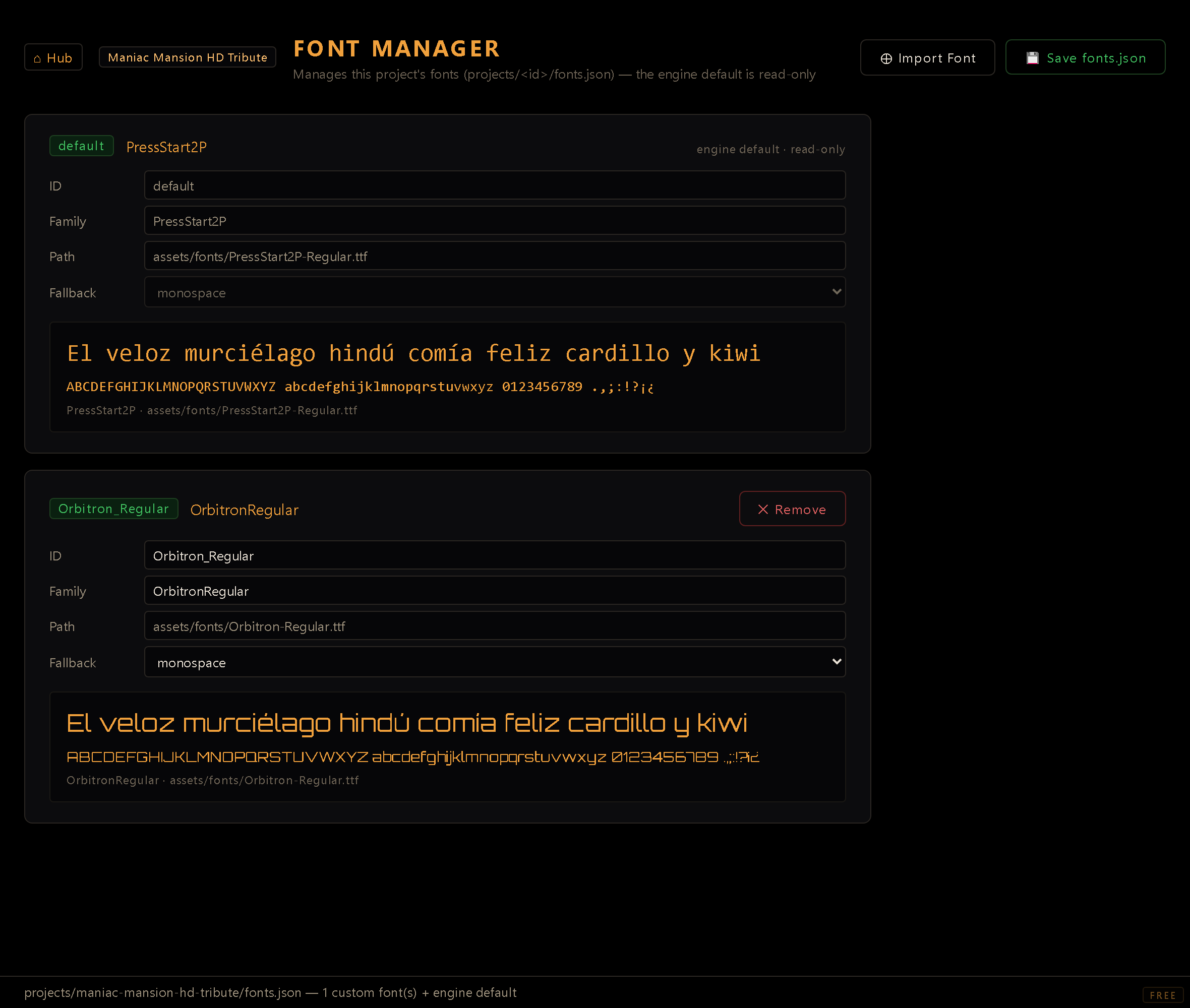
The Font Manager registers the custom fonts your project's GUIs can use. It manages a
per-project font registry (projects/<id>/fonts.json) on top of the engine's built-in
default font (always available, and replaceable by a font of your own).
You reach it from the Hub. It needs the dev server running, since it uploads font files
and writes fonts.json through it.
What it manages#
Each project keeps its own fonts.json: a list of registered fonts, each with a short
ID, a CSS family name, the asset path to the font file, and a fallback
stack. The engine default font is listed too, marked read-only. Click Override with a
font… on its card to make one of your own fonts the project's default: the card becomes
editable, and ✕ Remove on it brings the engine font back.
A font written into fonts.json by hand with only a family and no file (a system family such
as monospace) gets a card too: its Path reads No file: system family, and both the
editors and the game draw it with that family as the player's system provides it. The Font
Manager shows and saves such an entry, but it doesn't create one: every font it registers comes
from an imported file.
Saving folds your changes into fonts.json instead of rewriting it: a key the Font Manager
does not manage (a variable font's weight, extra faces files) survives a Save untouched.
Importing a font#
- Click ⊕ Import Font and pick a font file. It's uploaded to your project's
assets/fonts/folder, and the Asset Path is filled in for you. - In the Register Font dialog, fill in:
- ID: a short handle used in GUI descriptors as
font: 'id'. It must be a valid JavaScript identifier (letters, digits,_,$; can't start with a digit) and must be unique within the project. - CSS Family Name: thefont-familyname the browser/canvas uses (e.g.MyGameFont). - Asset Path: auto-filled from the import; the path to the font file. - Fallback Stack: fonts to fall back to if yours fails to load (e.g.monospace,sans-serif). - Click Register. The font is added to the in-memory list. The dialog carries a reminder: the font is copied into your project and ships inside your exported game, so make sure its license allows redistribution, and if it comes with a license file, drop that alongside the font.
Fonts you import are shipped with your game#
An imported font is copied into your project's assets/fonts/ and travels inside every
build you export, so redistributing it is your call, and your responsibility. The
Register dialog reminds you of this; it never blocks the import.
Before shipping a font, check that its license allows redistribution. Many free fonts
(anything under the SIL Open Font License, for instance) also require their license
text to accompany the file. Ignitor's own convention is a sibling file next to the
font, named after it (MyGameFont.ttf → MyGameFont.LICENSE.txt), which the export
carries along automatically. The engine's default font ships exactly that way.
A font that merely renders on your machine says nothing about whether you may distribute it: fonts installed with your OS or an application are usually licensed for your use, not for bundling into a product.
Using a font#
Reference a registered font by its ID in your GUI descriptors:
{ font: 'heading', /* … */ }
The ID is the contract: renaming it later means updating every descriptor that uses it.
Removing a font#
✕ Remove takes a font out of the registry. The font file on disk is not deleted: only the registration is removed, so you can re-register it later if needed. The engine default can't be removed.
Saving#
Changes (registrations and removals) are in-memory until you click Save fonts.json,
which writes the registry to projects/<id>/fonts.json. Save before leaving the editor.
Tip. Fonts are a per-project asset. Each project carries its own
fonts.json, so a font registered in one project isn't visible in another.