Cutscene Editor#
The Cutscene Editor authors ordered, non-interactive step lists (an NPC walking to a
door, a line of dialog, a wait, a cinematic scene) that play out with input locked, the same
way a classic adventure-game cutscene would. Most cutscenes are scoped to one room: they
live in that room's own rules file, alongside its hotspot reactions, watchers, and
globalWatchers (the same file the Puzzle Editor writes). A cutscene can also live in the
project-wide 🌐 Global bucket (rules/_global.rules.js) for beats that aren't tied to a
single room. It's triggered from anywhere (a hotspot reaction, a dialog choice, a puzzle rule)
with the CUTSCENE:<id> effect token, which resolves the id against the current room's
cutscenes first and falls back to the Global bucket if the room has no match, then hands
the step array to startCutscene().
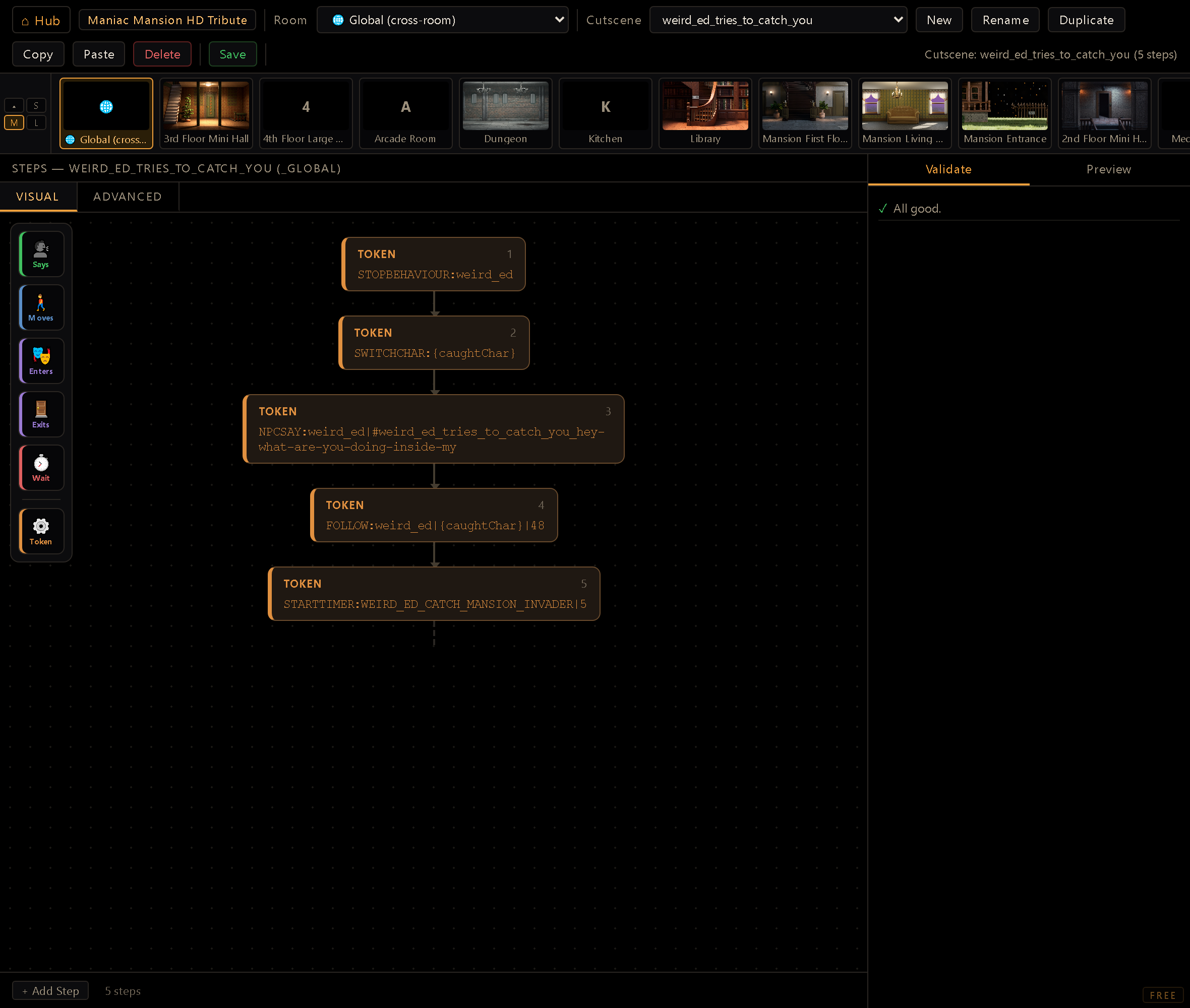
You reach it from the Hub (dev server running). The toolbar has a Room dropdown (with a synthetic 🌐 Global entry at the top), a Cutscene dropdown scoped to that room or bucket, and buttons to New (a modal that prompts for the name), Rename, Duplicate, Copy and Paste steps (the last two work across rooms and the Global bucket), Delete, and Save. New asks before it drops unsaved edits on the open cutscene; Duplicate carries them into the copy and says so in the status bar, while the original keeps its saved version. A strip of room thumbnails sits under the toolbar for jumping between rooms without going back to the dropdown. The 🌐 Global bucket gets its own card too; it comes in three sizes and collapses away, and your choice is remembered. The center pane shows the loaded cutscene's steps in one of two interchangeable views, Visual (friendly node cards) or Advanced (the full field-by-field editor), and the right pane holds Validate, Preview, and a hidden Export tab (shows the generated rules source, handy for debugging a save).
Come back to the editor and it reopens the room and the cutscene you were last editing, instead of leaving you on "select room" every time. If either is gone (the rules file deleted, the cutscene renamed) it falls back quietly: a room whose cutscene no longer exists still opens, with the cutscene picker empty. It's tracked per project.
Anatomy of a step#
Steps are a linear ordered list, not a multi-track timeline: exactly one thing happens at
a time, in list order, the same shape as core/cutscene.js consumes. Each row has a type
selector, a body of type-specific fields, a blocks/instant badge, and reorder/delete
controls. The editor exposes six typed step kinds plus a generic escape hatch:
- NPCENTER: an NPC appears already in the current room at a region's point (the door it "enters" from). Both NPC and Region are typed pickers (character list / the loaded room's regions). Instant.
- WALKNPCTO: an NPC walks to a target, picked via a player / hotspot / coords tab
group:
player(wherever the player currently stands), a hotspot's walk-to point, or raw X/Y (with a "⌖ Pick X/Y in room" button that reads a click off the room). Blocks until the NPC arrives: the runtime paths it there over however many frames it takes. Facing on arrival (opt.) is which way the actor ends up looking. Leave it blank and a hotspot target hands over thefacingset on that hotspot in the room editor, so walking up to a door turns to face it, exactly like a player's click does. Blank on aplayer/coords target keeps whatever heading the walk ended on, which for a door you just approached is usually backwards. Set it explicitly to override the hotspot's, or to aim a coords target; the eight canonical directions are available, diagonals included. - NPCEXIT: an NPC walks to an exit point in the current room (hotspot or coords, same tab
group as above) and leaves into a destination room (an autowired room picker). This one
isn't actually a
core/cutscene.jsverb: it serializes to theNPCEXITeffect token and falls through the runner's genericapplyEffects()catch-all, so it behaves like any other instant effect once dispatched, not likeWALKNPCTO's frame-by-frame blocking walk. - WAIT: pause for N seconds. Blocks.
- SAY: a speech line: an NPC (blank = narrator) dropdown and a text field. Blocks,
but there's no manual timing to author; the runtime auto-computes on-screen hold time from
the line's length (
sayDuration()incore/cutscene.js, roughly 1-6 seconds). If the project types its text (Typewriter, set in the Dialog Editor's style sandbox), the line types first and then holds for that same reading time. If the line has baked voice, the hold extends while the clip is still playing (capped at 30 extra seconds, so a stuck audio source can never hang the scene), and cuts short the moment the player skips, hold-to-skips, or the line ends and control moves on, a room warp included. - PLAYSCENE: plays a cinematic scene (an autowired scene picker, linking conceptually to
the Scene Orchestrator's clips) and blocks until it ends; the player can still
hold-to-skip in-game. (
REWINDSCENEexists at the runtime level too, for the VHS-rewind effect, but isn't exposed as a distinct step type here, only reachable via the raw slot.) - raw (effect token): anything else, through the same shared, manifest-driven
effects widget used by rules, dialogs, and the Puzzle Editor (single-effect mode): a verb
dropdown plus typed/looked-up argument fields, never free text for an ID-bearing arg. This is
how a cutscene fires
SETFLAG,GIVEITEM:<item>|<char>,SWITCHCHAR,WARPTOROOM,CUTSCENESPEED, or anything else in the effect manifest.
Steps reorder two ways: drag the row by its header, or use the ▲/▼ buttons; both call the same reorder path. Delete is a single × per row, no confirm.
Party & focus targeting#
For games with a party, a cutscene can't always hard-name a character: the player may not have recruited them. Two mechanisms cover that, and both surface as pickers, never free text:
{partySlotN}: a 🧑🤝🧑 slot option in any character field (and the SAY/NPCSAY speaker dropdown) that resolves to the Nth committed party member at runtime. An empty slot no-ops the token; for a SAY/NPCSAY line, an empty speaker simply skips the line rather than popping a ghost bubble.IFINPARTY:<charId>: a per-step guard select in each step's header. The step runs only when that character is in the active party; otherwise it's transparently skipped. (With no party system in play, the guard is simply inert.)
A third sentinel, {_prevChar}, is offered in character pickers for the SWITCHCHAR pattern
below: it stands for whoever was in control when the cutscene began.
Visual & Advanced views#
The center pane toggles between two views of the same step list: edits in one show up in the other instantly.
- Advanced is the field-by-field editor described above: every typed field, guard select and picker laid out in full. Reach for it when you're wiring exact arguments.
- Visual renders the sequence as a chain of friendly node cards: "Says", "Moves", "Enters", "Exits", "Wait", "Scene", "Token", each with a BLOCKING badge when it holds the sequence. You can pan/zoom the diagram, add a node by dropping it into the chain, reorder, delete, and edit a SAY line inline; clicking elsewhere on a node opens the full editor. It's the read-at-a-glance view for seeing shape and flow before diving into arguments.
Sequencing model#
core/cutscene.js ticks the active step every frame and only advances the cursor once a step
resolves. There's no parallelism between steps, though a blocking step (a walk, a wait, a SAY
hold, a scene) doesn't freeze the rest of the engine; the room keeps rendering and other actors
keep animating around it. WARPTOROOM and SWITCHCHAR are blocking too, at the runtime level:
both are async shell operations (a room load, in SWITCHCHAR's case possibly cross-room), and
the runner yields until the shell clears state.warpPending so a step scripted for the new room
doesn't fire while the old one is still on screen. CAMERAPAN blocks as well, even though it comes
from the raw slot: the runner moves the camera frame by frame, advances once it arrives, and keeps
the camera on that point until the cutscene ends (see Moving the camera in a cutscene in the
effect-tokens reference). REWINDSCENE blocks like PLAYSCENE, and PLAYANIM blocks only when
its third argument is block. Every other token not covered by a typed step
(anything from the raw slot) is instant, applied through the same applyEffects() the rule
engine and dialogs use, so there's one dispatch path for state-mutating tokens everywhere in the
engine.
The blocks/instant badge in both views asks the runner itself (cutsceneStepBlocks() in
core/cutscene.js), so it always matches what the step does at runtime, including a CAMERAPAN
or WARPTOROOM typed into the raw slot, and an NPCEXIT, which shows as instant. It also reads
inside a conditional: a blocking token wrapped in an IFINPARTY still badges as blocks,
because that is what it does when the branch is taken. A wrapper that hid the answer would be the
worst version of this badge: it would read instant on exactly the step whose timing you were
checking.
SWITCHCHAR can also target an NPC for a momentary focus: a mini-cutscene that pans control
to a character, plays a beat, and hands control back. Pair it with the {_prevChar} sentinel
to switch back to whoever was driving when the scene began, without hard-naming them. The focus
is authorial, not player control: the switch is skip-safe (the return still runs on a hold-to-skip)
and doesn't disturb saves or cut the background music if the NPC has no theme of its own.
While a cutscene runs, the shell hides the GUI and locks player input; a player left-click during
a SAY step skips straight to the next line (a line still typing completes on the first click,
and the next one skips), and holding the mouse down triggers hold-to-skip,
fast-forwarding the whole sequence. The skip collapses every blocking step, not just the
timed ones: WAITs and SAYs end instantly, a WALKNPCTO teleports the NPC to its destination
(with the arrival facing it would have ended on), a CAMERAPAN lands the camera on its destination, a WARPTOROOM changes room without its fade,
and a PLAYSCENE that hasn't started yet is stepped over; a scene already running keeps its
own hold-to-skip. The world you land in is the world the cutscene would have built, just
without the waiting. The mouse cursor hides too, unless a
SETCURSOR:visible=show step brings it back: input stays locked either way, so the cursor becomes
a prop the cutscene itself drives (which cursor, which frame, pinned where; see the SETCURSOR
section of the effect-tokens reference), and the override cleans itself up when the scene ends.
Validate tab#
Runs on every edit, and Save refuses to write while an error is showing: missing/unknown
NPC ids, a non-positive WAIT, and (see below) a raw token missing a required argument all
count as errors; an empty region on NPCENTER, an incomplete hotspot/coords target, and empty
SAY text are warnings, which don't block. A second async pass checks that referenced regions
and hotspots actually exist in the loaded room's own data. It also accepts the dynamic
sentinels ({partySlotN}, {_prevChar}) as valid targets, while still warning on a party guard
that names a character it doesn't recognize.
A raw step's effect token is checked the same way the Puzzle Editor checks a reaction's
tokens. SETFLAG: with no flag name, or any other token missing a required argument, is a
step that will do nothing at runtime, now flagged as an error (blocking Save) rather than
sailing through unchecked, the same judge (and the same argument label the widget itself
shows) shared with the Puzzle Editor's and Reactions Editor's own empty-argument checks.
One of those findings does get a word in at save time. An empty SAY is skipped outright by the
runtime: it isn't a beat of silence (that's what WAIT is for), it's a step that does nothing at
all. That's the safe behaviour, and it's also why the editor asks: because the step vanishes
silently, playing the game will never show you that a line is missing. So saving a cutscene that
still has one asks first, naming the step. It's a question rather than a refusal on purpose: an
empty SAY is exactly what you have mid-thought, and you should still be able to save the work and
come back to it.
Deleting or renaming a cutscene warns you first if anything still points at its id (a
CUTSCENE:<id> token in another rule, dialog, or cutscene) so you don't silently orphan a
trigger.
Preview tab#
Runs the real core/cutscene.js runtime (startCutscene/tickCutscene) against a scratch
in-editor state, not a simulation of it. ▶ Play ticks it at 60fps via setInterval, ⏭
Step advances one tick at a time, ↺ Reset clears the run. There's no rendered mini-scene;
instead a text log reports each step as it resolves ([VERB] arg, walk-start/arrived with
rounded coordinates, wait countdowns), which is enough to confirm ordering and blocking behavior
without wiring the cutscene into the game first. The ? next to Log says that NPC walks in
preview are straight-line (no walkable-polygon pathing), though timing matches the real engine
speed.
Content i18n#
SAY text is authored monolingually, in the project's defaultLocale, same rule as the
Dialog Editor. On save, promoteSaySteps() mints a stable lid for every new line (or updates
the existing one in place if the step already carries one) and serializes the step as
SAY:<npc>|#lid (or SAY:#lid for a narrator line), never an inline {es, en} pair. The
Translation Editor fills in every other configured locale afterward; loading a cutscene back
resolves the lid to its defaultLocale text for display, so what you see in the field is always
the authored line, not a raw id.
Save has to know which language that is. If the editor can't read the project's settings, Save stops and says so in the status bar instead of filing your lines under a guessed language: nothing is written, and saving again retries the read.
Workflow#
- Pick a Room: the list covers every room in the project (not just ones with an existing rules file; one is created on first save) plus the 🌐 Global bucket for cross-room beats.
- Pick an existing Cutscene from the dropdown, or click New and name it in the modal.
- + Add Step to append a step (defaults to
SAY), then pick its type and fill the type-specific fields: every ID-bearing argument is a picker (character, region, hotspot, room, scene), never free text. Changing a step's type starts it over with the new type's empty fields (the character carries over when the new type has one), so a SAY you switch to another type and back comes back empty rather than with its old line. - Reorder with drag or ▲/▼; delete with ×.
- Keep an eye on Validate as you go.
- Walk it in Preview (Play/Step/Reset) and read the log to confirm the sequence and blocking behave as expected.
- Save to write the room's rules file. Since that file is shared with the Puzzle Editor,
any author
//comments anchored to a reaction or watcher elsewhere in it survive a save from here too, even though this editor has no UI to show them. The one blind spot is a comment written directly inside your own cutscene content: it has no name to anchor to, so Save warns you before dropping it.
CUTSCENE:<id>checks the current room first, then the Global bucket. A room-scoped cutscene and a Global one are two different homes: the same id string in two different rooms is two unrelated cutscenes, but the 🌐 Global bucket is the one shared namespace, meant for beats that any room can trigger. If a hotspot reaction or dialog choice firesCUTSCENE:<id>and nothing happens, the usual cause is that the id lives in a different room's rules than the one the player is standing in, and it isn't in Global either, so the fallback finds nothing. Cross-room beats belong in Global; room-specific ones stay with their room.Saving rewrites the whole rules file, including the reactions and watchers you didn't touch. That's by design (one file per room, one serializer), and it's why the Export tab is useful for eyeballing what a save will write. The author notes written on the room's reactions and watchers (the ones the Puzzle Editor and the Reactions Editor edit in a field) survive that rewrite untouched, even though this editor shows no field for them: they travel with the file, anchored by name, and the header block at the top is preserved as always. What the round-trip can't carry is a
//note written inside a block re-emitted from the live object (cutscenes:being exactly that, which is why it matters here) so the editor warns and lists those before writing, and cancelling leaves the file untouched: nothing is written and nolidis minted.