Project Doctor#
The Project Doctor looks at your whole project in one pass and answers two questions: how much does this weigh, and how much of that is waste? Every other check in Ignitor is per-domain: one room, one puzzle, one dialog tree. This is the one that sees everything at once, so it catches the things that only show up from above: the background you replaced but never deleted, the music track that ships in every build and never plays, the translation for a button that no longer exists.
You reach it from the Hub (dev server running). The Distribution Manager also shows a one-line summary before you press Start, so you find out before you build, not after.
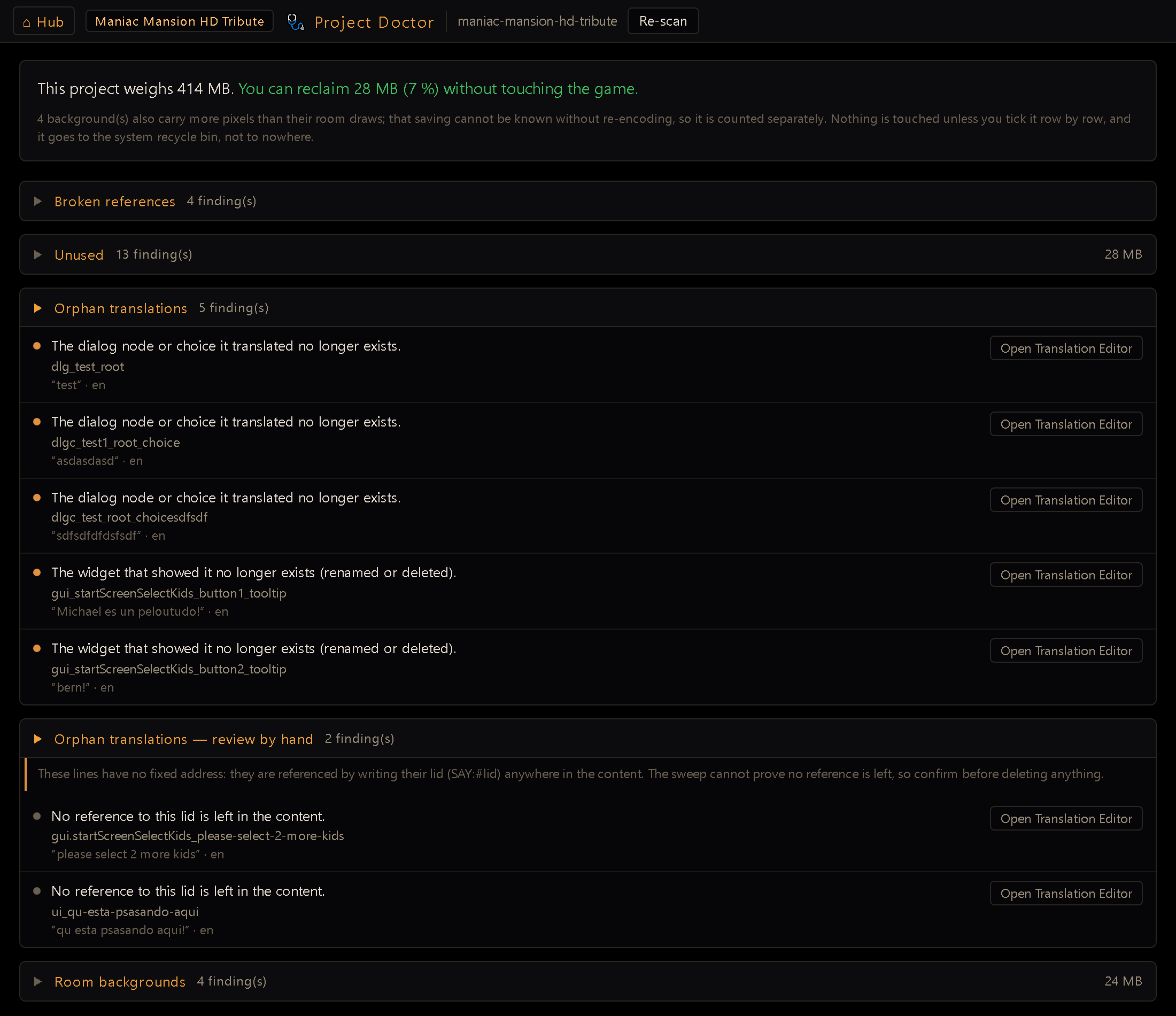
The verdict line#
The top line is the honest summary: what the project weighs, and how much you can reclaim without touching the game. That megabyte figure counts only files that are safe to delete: unused assets and the dead half of a duplicate pair. Oversized backgrounds are reported separately as a count, never folded into the number, because their real saving can't be known until you actually re-encode the art. A report that promises megabytes it can't deliver is one you'd stop trusting by the third time.
If a room's file wasn't authored by the Room Editor and can't be parsed, the verdict line says so by name: everything addressed into that room is invisible to the lid checks below, not because it's clean but because the Doctor can't see it; a hand-written room costs you that blind spot rather than a guessed, possibly-wrong finding.
What it looks for#
Each kind of finding gets its own collapsible section, with a count and, where it's meaningful, the disk weight.
| Section | What it means |
|---|---|
| Broken references | A file the game will ask for isn't on disk. The only finding here that means a broken game rather than wasted space: everything else is weight. Usually your project names it; sometimes the engine does, and the row says which. |
| Unused | Files nothing in the project references, plus the leftover half of a source/processed pair (when you convert a track, only one of the two still plays). The Room Editor's alternate backgrounds (assets/rooms/alternates/) show up here too, but they no longer ship in an exported game unless a room uses one: deleting them only frees space in the project. |
| Orphan translations | Rows in your translation table that nothing can display any more. |
| Dangling / empty lids | The mirror image: content that names a translation row which doesn't exist, or exists with no text in any language. |
| Room backgrounds | Background art carrying more pixels than its room actually draws, so the extra is decoded and thrown away every frame. |
| Animations | Animations heavy enough to strain the bitmap budget, and frame timings that can't land on a refresh so the motion judders. |
| Audio | WAV files big enough to be worth moving to OGG. |
| Character ids | Ids that break the character-id rule: a clash by prefix, a duplicate, the reserved player, or a malformed id. |
| Character animations nobody owns | Character animations whose key doesn't start with any character's id and that nothing in the project names. |
Rows link straight to the editor that owns them, so a finding is one click from the place you'd fix it.
An Unused row now says whether the file still reaches your players. A few folders are author-only (room background alternates are one) and every export door leaves them out, so an orphan there wastes disk but not build weight. The row tells you which one you are looking at: it no longer ships in the exported game, but it takes up space in the project, against the original nothing references it, yet it ships in every build. The one-line summary the Distribution Manager shows before you press Start counts only the second kind, because that line is about shipped bytes. It holds the other way round too: an alternate your project actually uses is not unused at all, and it ships like any other asset.
Reclaiming space#
Only Unused rows can be ticked, and nothing is touched until you tick it; there is no "clean everything" button, on purpose. Tick the rows you want, then send them to the recycle bin.
Check the warning above the button before you confirm. On some setups the deletion is permanent rather than recoverable, and the Doctor tells you which one you're getting before you commit, not after. If it says removal is permanent, the fix is a one-line install (
pip install send2trash); do that first if you want the safety net.
Putting back the cursors#
Most broken references are yours to fix: only you have the room background or the voice take that went missing. Cursors are the exception. Every project uses a set of mouse cursors, and unless you've drawn your own, that set is the one the engine ships, so when those PNGs aren't in your project, the editor already has the art to put back.
When the Doctor sees that, Restore the factory cursors appears under the Broken references
section. It copies in only what's missing, and it will never overwrite a cursor already
there: if you drew your own hand.png, it stays exactly as you left it. There's no confirm
step, because there's nothing to lose: the action only adds files.
It also won't invent one. If your project asks for a cursor the engine has no art for (a custom one you named yourself), it's skipped and stays on the report, which is the truth: that one really is yours to supply.
A cursor row can be listed as named by the engine, not by your project. That isn't a mistake in your project. It means you never customised your cursors, so the engine is using its own defaults, and those expect their art to live inside your project. It's the usual reason a project made with an older version of the editor shows five of these at once.
Orphan translations, and why there are two lists#
When you rename a button, delete a hotspot, or drop a dialog choice, its translations don't follow it out. They stay in the translation table forever: taking up a row, showing up in the Translation Editor, and never rendering again for anyone. The Doctor finds them, but it splits them into two lists, because it is not equally sure about both.
Orphan translations is the confident list. These rows are addressed to a specific thing (this widget, this hotspot, this item, this dialog choice) and the Doctor checked the whole project and found no such thing. Each row says what went missing, shows you the text you'd be giving up, and lists which languages it holds. A translation of one of the game's built-in menus (Options, Save/Load, the quit confirmation, the inventory popup) never lands here: those screens ship with the engine, and the Doctor counts them as displayable even though your project has no file for them.
Orphan translations: review by hand is the careful list. Spoken lines don't have a fixed address: you reference them by writing their ID into your content wherever you want them said. The Doctor searches your project for each one, but "I didn't find a reference" is not the same as "no reference exists", so these are reported for you to confirm, never presented as settled.
Both lists can be swept: tick the rows you want gone and press the delete button at the foot of that list. Each list has its own button and acts only on its own rows, so a "tick all" in the confident list can never carry a careful-list row along with it. Nothing is ever pre-ticked.
Read the text before you tick. Every row shows the text it holds and which languages it holds it in, because that is the thing you are about to lose: the whole record goes, every language with it. Before writing, the Doctor parks a copy of your whole translation table in
.tmp/bak/, and that copy is the only way back. If the row still holds work you want, don't sweep it: open the Translation Editor from the row and move the text where it belongs.
The careful list is careful for a reason, and the sweep respects it: the server checks each row again before deleting it, and refuses any whose ID it can still find written somewhere in your project, even if you ticked it. Those come back in the result as kept, not deleted. What it cannot check is a reference living outside your project folder, which is exactly what that list's warning is about.
Dangling lids and empty rows#
Orphan translations finds a row nothing points at anymore; this is the opposite
direction: content that points at a row that isn't there. Lines pointing at nothing
lists a #lid your content references that has no matching row in the translation table at
all. This one is reported as an error, not a cleanup suggestion, because of what it costs
in play: a room-level SAY/NPCSAY referencing a missing lid doesn't fail or warn; the
character speaks the raw #lid and burns the whole pause as if a real line had been said.
It is at least visible; it used to be an empty bubble, which was the same broken beat with
nothing on screen to diagnose it by. It usually comes from a save caught mid-flight, where the editor mints
the lid before the text that goes with it is written.
Translation rows with no text is the sibling case: the row exists, but no configured language has anything in it, so on screen it renders exactly like a dangling reference. Resist the urge to sweep these: you can't, on purpose. An empty row means the reference exists and the text is missing. Deleting it cleans nothing, it promotes the row to dangling.
Both checks only look at names built from a room, hotspot, item, dialog or GUI address (the
#ref-style minted family), never at a free-authored literal, since an overlay you typed
directly into your content already has the literal itself as a fallback and was never going
to render empty.
Character ids, and the animations nobody owns#
Animations belong to a character by prefix: nurse_edna_walk is Nurse Edna's because her
id is nurse_edna. That only works while no id is another id followed by _: with both
nurse and nurse_edna in the roster, nurse_edna_walk could be either's, and the Anim Editor
refuses to pick. The Character Editor won't let you create that pair, but a project can already
carry one from before the rule existed, and that is what Character ids is for: each row
names the two ids, lists the animation keys left ambiguous, and links to the Character Editor,
which won't save until the roster is clean. Duplicates, the reserved player and malformed ids
land in the same section; the last one is only a warning, since the game still runs.
Character animations nobody owns is the other symptom of the same history. Renaming a
character moves nothing (its animations keep the old prefix), so edna_walk outlives Edna's
rename to nurse_edna as a key no character claims and no room, rule or cutscene mentions. The
row is a warning, not an error: the animation is just unreachable. Open it in the Anim Editor and
re-key it, or delete it if the new character already has its own.
What it deliberately stays quiet about#
A check that cries wolf gets ignored, so several things are silent on purpose:
- A room that's big because it scrolls. Backgrounds are judged against the size the room declares, never against your game's resolution, so a long scrolling street whose art matches its declaration is correct, and says nothing.
- A WAV you might need as a WAV. One with loop markers, or referenced in a way that renaming would break, is never suggested for conversion.
- A one-frame animation. That's a fixed pose, not a cycle, so it can't judder and isn't reported as if it could.
- Rooms it can't read. A room written by hand rather than saved from the Room Editor may not parse. Rather than guess, the Doctor stays quiet about everything addressed into that room; it would rather miss a finding than invent one.
The same principle runs through the whole report: a missed finding costs you some disk space, but a false one sends you to delete something your game still needs.
Re-running it#
Re-scan re-reads the project from disk. The scan is fast even on a large project, and the result is only cached for a few seconds, so a report never tells you to delete files you already deleted.