Reactions Editor#
The Reactions Editor is where you author what happens when the player interacts with the world: look at a door, use a key on a lock, give an item to a character, walk into a trigger. For every interaction you build a reaction: a chain of effect tokens (say a line, set a flag, grant an item, open a room…) run in order.
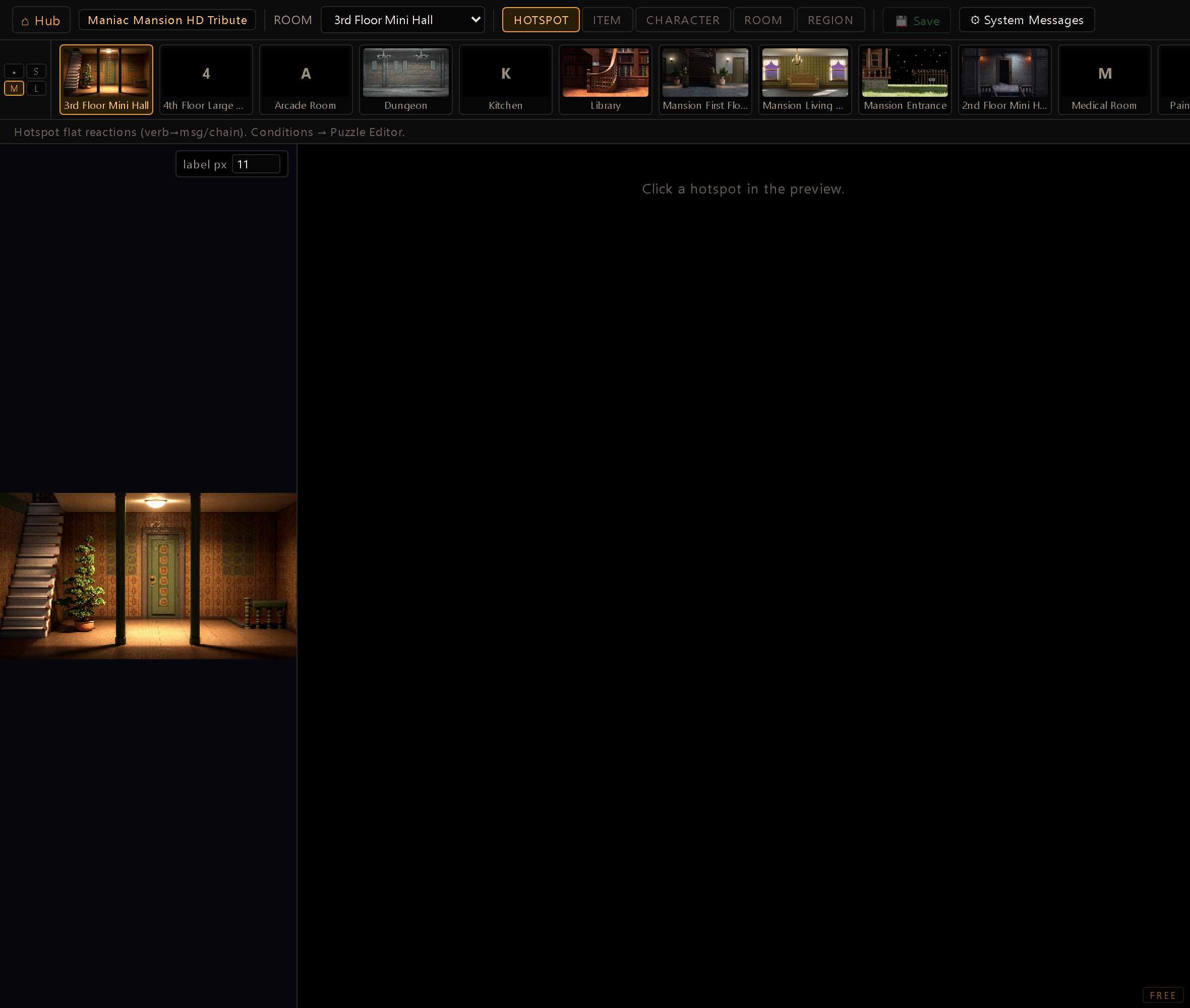
You reach it from the Hub (dev server running). It opens on the active project; pick a Room (and, in the right mode, an Item or Character) from the toolbar. Switching room, hotspot, item, character, or mode with unsaved edits asks first: Keep editing leaves you where you were with the edit intact, Discard & continue drops it and moves on. A stray click never silently drops a chain you were building. In the modes that work on a room, a strip of room thumbnails sits under the toolbar for jumping between rooms without going back to the dropdown. It comes in three sizes and collapses away, and your choice is remembered; the item and character modes hide it, since neither is scoped to a room.
The editor also remembers where you were: come back to it and it reopens in the mode you were in, on the same room, item or character. Each mode keeps its own pointer, so switching to ITEM and back to HOTSPOT lands you on the room you had, not on an empty picker. If what you were editing no longer exists, the selector simply comes up empty instead of erroring. Like everything else here, it's tracked per project.
The five modes#
A row of mode tabs decides what you're attaching reactions to:
- Hotspot: the core grid. Pick a room and you get a verb × hotspot matrix: every hotspot crossed with every verb (look, use, take, open…). Each cell holds the reaction for that verb on that hotspot. The room canvas alongside shows the hotspots (scroll to zoom, drag to pan).
- Item: reactions tied to an inventory item: using the item on the world, combining it with another item, and so on.
- Character: per-character reactions and lines, including the bilingual messages a character can speak. Talk to gets its own row with three modes: Line (the character answers with one sentence), Dialog (opens a conversation; pick one or create it with New dialog…) and Chain (any effect chain). It's the same row the Character Editor shows, so either place edits the same reaction. If the project's dialog list can't be read, the status bar says so when you open a character: an assigned dialog shows as missing, but it is kept when you save.
- Room: room-level entry reactions that fire when the player arrives: on the first visit, on every visit, or on a specific visit count.
- Region: walkover reactions that trigger when a character walks over a region of the floor (plain, or gated by a puzzle rule; see below).
How a reaction cell works#
Each cell shows whether it holds no, one or many effects. Click it to open the
shared effect-chain editor (the same token picker used across the cutscene and puzzle tools)
and build the sequence step by step; the arguments autowire from the project (rooms,
hotspots, items, characters). A reaction is just an ordered list of tokens, so "look at the
painting" might be a single SAY, while "use key on door" could be SAY → SETFLAG →
PLAYSOUND → WARPTOROOM.
Because reactions are effect-token chains, everything on the
Effect tokens page applies here: tiers, argument formats,
{flag} interpolation, and the rule that new tokens must be registered in the manifest.
Puzzle-rule guarding: edit or create in place#
A plain reaction always fires the same way; sometimes you want it gated by a condition: "only if the safe is already open", "only after Act 2". That condition is a rule in the Puzzle Editor, but you never have to leave the Reactions Editor to wire it up. Every verb row carries a puzzle-rule affordance, in one of two states:
- A row that already has a rule shows the amber ⚡ puzzle rule badge. Click it to open the guarding rule in a modal, right there: the condition and the effects that fire when it's met. Add or remove rules, edit the condition, and Save rules writes straight back to the puzzle file. Anything beyond this verb's rule (watchers, other keys) stays in the full Puzzle Editor.
- A row with no rule yet shows a dashed +⚡ create puzzle rule button. Click it and the
same modal opens with the rule's key already seeded (
<hotspot>.<verb>, read-only; the key is the address the engine looks it up by) and one empty rule ready to fill. Save it and the badge flips to the solid ⚡ in place, no reload. An empty rule you never fill is dropped on save, so a stray click can't silently kill the plain reaction underneath it.
The modal also carries an Author note field for the rule you're looking at: why this rule
exists, which the rule itself can't say. It's saved into the .rules.js as a // comment right
above that entry, anchored to the key rather than to a position, so it survives the save and rides
along when rules are reordered. (It's the same field the Puzzle Editor shows
on every reaction and watcher card; there the key is editable and a rename carries the note with
it, while here the key is the entity's address and read-only.)
Save rules rewrites the room's whole puzzle file, not just the rule you edited. Everything in
the model round-trips safely, notes included, and the header comment block at the top of the
file is preserved. The one thing that can't be carried is a comment written inside a block
re-emitted from the live object (cutscenes:); the editor stops and lists those before writing.
Cancel leaves the file byte-for-byte as it was.
This is not hotspot-only. Character verb rows carry the same badge: their rules live in
the 🌐 Global bucket (_global.rules.js), so a guarded NPC reaction resolves even when the
player has wandered into another room. Item-interaction composite rows get a badge per
verb_item pairing, and Region walkover rows can be made conditional the same way.
A badge answers for its own key and nothing else. The plain use row is about
<hotspot>.use; <hotspot>.use_coin belongs to the item-interactions section further down,
which carries its own badge for that pairing. So a hotspot whose only rule is a composite
shows the plain verb in the create state (that verb genuinely has no rule of its own) and
clicking it starts a rule under the plain key rather than opening the composite's. The same
split holds for a character: <charId>.give and <charId>.give_coin are separate rows with
separate rules.
A composite whose behaviour lives entirely in a rule (you created it with ⚡ and never filled in a plain reaction) still gets its row here, seeded from the rules file rather than from the entity. Without that it would be invisible on the very surface that created it, while working perfectly in game.
Deleting a row with a rule deletes the rule. On a character, the ✕ of a verb-and-item row
that has a rule asks first, because that rule is what makes the interaction work in game.
Confirming removes it from _global.rules.js along with its comment; every other rule in the
file stays as it was. A row without a rule simply goes away. While a row has a rule, its verb
and item are locked: to change either one, delete the row with ✕ and add another.
System messages#
The ⚙ System messages button edits the engine's generic messages: the fallbacks and
status lines that aren't tied to a single hotspot. They come in families: interaction
fallbacks ("nothing happens" for an unknown verb, two things that don't combine, and the two
lines of a door with a lock, "It's locked." and "It's already unlocked."),
character fallbacks (someone with nothing to say, someone refusing an item), object interaction
(the default pickup and use lines), environment (light on/off), HUD hints (the "hold key to
skip" prompt over a cutscene; its {key} is filled in with whatever key the player actually has
bound, so reword the sentence, not the key; plus the short labels beside the gamepad's button
prompts and the notice that pauses the game when the controller disconnects), and save/load, which also
carries the honest failures a player occasionally meets: a save that didn't fit, a save file that
came back damaged or written by a newer version of the game, a door that wouldn't open. These
come from the engine's core/systemMessages.js catalog and your edits save straight to the
project's string-table catalog (strings.json) under a deterministic lid (sysmsg.<id>), the
same lid the Translation Editor always lists, so you can reword the
whole engine's voice here or translate it there, without touching code.
A scope selector at the top of the modal decides whose voice you're editing. (Generic: all characters) is the shared default: all the messages, one voice for the whole game. + Add character voice lists every defined character, and picking one narrows the modal to that character's overrides, but only for the voiced messages, the ones the player reads as narration (the fallbacks, the pickup line, the interact line). Mechanical confirmations (save/load, light on/off) stay generic, shared by everyone, and don't appear in a character scope. Overrides are sparse: leave a row blank and that character simply inherits the generic line. At runtime the active character's override is tried first, then the generic message, then the engine's built-in default, so a gruff character can grumble "Can't." while everyone else gets the polite fallback.
Each tier looks for the exact language. If you wrote an override only in your project's default language and the player is playing in another one, the engine does not hand back your override in the wrong language: it drops to the next tier and uses the translation it ships for that language. So an untranslated override shows up only in the language you wrote it in. Translate it in the Translation Editor to reach the rest.
Save-time checks#
Save blocks on a required argument left blank. Before writing anything, the editor
scans every effect token you've authored (the per-verb chains, the composite
<verb>_<item> rows, and the Room mode's onEnter events) against the effect manifest, the
same judge the Puzzle Editor uses. Hit one and nothing is written: a one-line status names
exactly where to look and what's missing, e.g. "Not saved: in "give", token SETFLAG is
missing a required argument (Flag)." The ⚡ puzzle-rule modal carries the same gate on
its own save: it reopens on the entry you were editing instead of closing and losing your
work, so a blocked save costs you nothing you'd typed.
Validate also warns (never blocks) when a chain's own order risks a stall. Opening an
engine modal that pauses the world (the inventory bag, Options, Save/Load, quit
confirmation, the pause menu) and then waiting on a blocking walk in the same chain strands it: a
WAIT/WAITFOR keeps counting down under the modal, but nobody walks, so after 10 seconds
the chain is aborted and the tokens after the walk never run. A CLOSEGUI for that modal
before the walk clears the warning. The
check also flags a chain that runs into a scene/cutscene/arcade takeover (fine once it ends,
a problem if it never does on its own) or a token that rebuilds the world and silently drops
whatever was queued after it. It's the same lint the Puzzle Editor and the Room Editor's own
reaction modal share: the three places that author these chains.
Where reactions are saved#
Save writes each kind of reaction back to its natural home:
- Hotspot / Room / Region reactions live inside the room module (
hotspot.reactions[verb]and friends), saved with the room. - Item reactions save to the project's
items.json. - Character reactions/messages save to
characters.json. - System messages save to the project's
strings.jsoncatalog (a deterministic lid per message; a message left at the engine default writes nothing).
Verb IDs are fixed and English. The grid is built from the engine's verb list (
core/verbs.js); reactions are keyed by verb ID (look,use,give…), which stay in English even when the editor UI is localized. Renaming a verb ID would orphan everyhotspot.reactions[verb]; only the labels localize.Reactions are content: commit them. They live on disk in the room / items / characters files, with no undo across a reload. After a substantial authoring pass, commit so Git is your safety net.