Dialog Editor#
The Dialog Editor builds conversation trees: the NPC lines and player choices that drive
a TALK interaction. A dialog is a set of nodes, each with an NPC line and a list of
choices; picking a choice can jump to another node, end the conversation, gate itself
behind a flag, or fire effect tokens. It saves to the project's dialogs.json, keyed by the
dialog's own id.
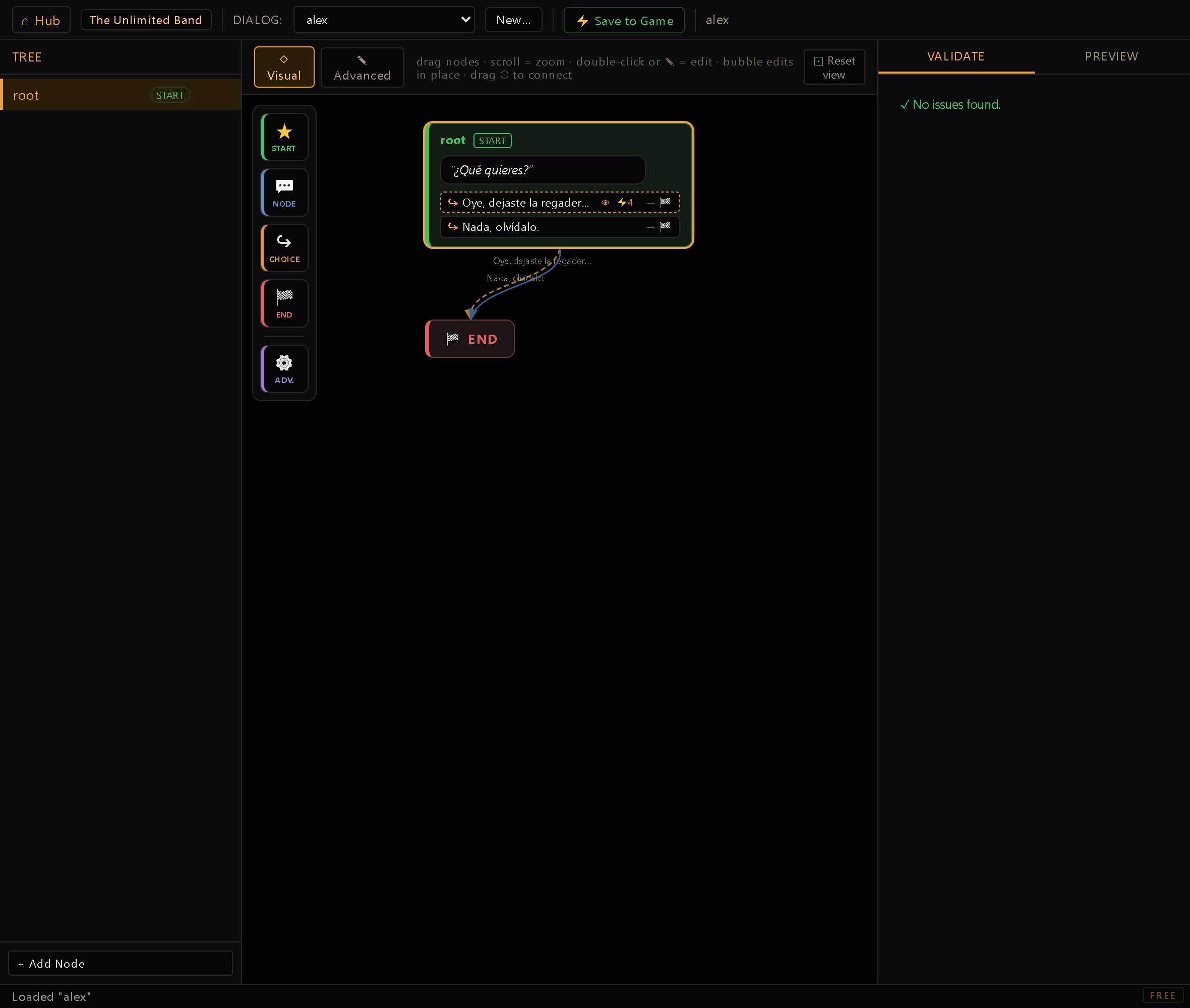
You reach it from the Hub (dev server running). The TREE panel on the left lists every node in the loaded dialog; the center panel opens in the ◇ Visual graph of the whole tree by default and toggles to the single-node ✎ Advanced form; the right panel holds VALIDATE and PREVIEW.
Come back to the editor and it reopens the dialog you were last editing. A link from another editor always wins over that memory (it's someone saying "take me to this one") and the memory only applies when nobody asked for anything in particular. A link pointing at a dialog that no longer exists leaves you on the empty state without touching what you had remembered. It's tracked per project.
Creating a dialog#
New… asks first Who do you talk to? and lists your characters. Pick one and the editor
proposes a dialog name from that character's id (with _2 added if they already have one); you
can still type your own name, in lowercase with no spaces. The first time you Save to Game,
Talk to on that character starts opening this dialog: there's no trip to the Reactions
Editor to link them. If the character already opens another dialog, the form tells you which one
before you create it; that older dialog isn't deleted, it just stops being the one Talk to opens.
Pick (nobody, I open it from a reaction) for a dialog you'll start some other way, from a reaction or a cutscene.
Anatomy of a node#
- Node ID: the node's key inside the tree, shown as the section title. It's what goto targets reference, so renaming a node (via the tree panel's rename action) rewrites every choice that points at it; the editor keeps those in sync for you. Renaming a node (or retyping a Choice ID) also carries the saved translations of its line and every choice under it to the new address. If that address already holds translations (usually an orphan left by something deleted), the editor shows you the parked text, locale by locale, and asks whether to use it (your own source-language wording still wins) or discard it; cancelling changes nothing. One case doesn't stop to ask: a choice still wearing its placeholder id gets slugged automatically as you type its text, so the move happens mid-sentence. There the editor keeps what you typed and tells you the old address held on to its translations, rather than interrupting an edit you were in the middle of.
- NPC line: the line the NPC speaks when this node is current. It's authored
monolingually in the project's
defaultLocale(content i18n): you type it once, in one language, and translations are filled later in the Translation Editor, not inline here. - Start node: one node per dialog is the entry point (
tree.start); the tree panel marks it with a badge, and any node can be promoted with the ★ action.
Choices#
Each node holds an ordered list of choice cards, reorderable with ↑ / ↓:
- Choice ID: a stable key for the choice, auto-slugged from its text the first time you
type it (edit it directly to override). It's what the
once-seen bookkeeping and the validator's duplicate check key off of. - Text: the player-facing line, same monolingual-authoring rule as the NPC line.
- Goto: the node this choice leads to, or END to close the conversation. Leaving it blank is only valid on an END-equivalent choice; the validator flags a goto pointing at a node that no longer exists.
- showIf / hideIf: flag names that gate the choice's visibility at preview/runtime:
showIfrequires the flag to be set,hideIfhides it once the flag is set. The autocomplete offers three sources at once: every flag the project already uses anywhere (the same server-side scan the effect editor's flag pickers read), the flags typed into this dialog but not saved yet, and the reserved engine flags (names the engine maintains itself, like the live party size, which no project scan can find and you would otherwise have to know by heart). It stays free text on purpose: a flag is created by being written, so a name nobody has used yet has to be typeable. - once: hides the choice again after it's been picked the first time (per dialog, tracked internally as a seen-flag).
- Effects: the shared effect-token widget (same one used across rules and cutscenes), with
every ID-bearing argument (room, item, flag, hotspot…) as a typed picker rather than free
text. These run through
applyEffects()when the choice is picked, soSETFLAG,GIVEITEM:<item>|<char>,SAY, and every other token behave exactly as they do in a rule or cutscene. Each token carries a⠿grip on the left: drag it to reorder the chain, and drop it into or out of an if-block. A token can move from the main list into a THEN branch, or back out, without retyping it. (The grips live in the ✎ Advanced view; the Visual view shows the graph, not the node form.)
Visual view (the default)#
The center panel opens in ◇ Visual, an interactive map of the whole conversation, and toggles to the classic single-node form with ✎ Advanced. Visual is where you'll usually work: every node is a card, every choice a cable to the node it leads to, so you see the shape of a dialog (its branches, dead ends, and loops) and edit it in the same place.
The map reads by colour and line:
- The start node is green (the conversation's single entry point) and the END sink is red (where every closing choice lands). Ordinary nodes are neutral, each labelled with its id, its NPC line, and how many choices it holds.
- A conditional choice (one gated by
showIforhideIf) draws its cable dashed amber instead of a solid line, so the branches that only open under the right flag stand out from the ones always on offer. - A once choice is prefixed 1× on its label; a choice that points back at its own node (a self-loop) is listed as a ↩ annotation under the node rather than a cable curling back on itself.
It's a working surface, not just a picture:
- A palette across the top adds pieces in the order you build a dialog: START (mark the selected node as the entry point), NODE (a new NPC line; it asks for the node's id, with a suggested one already filled in, so Enter is enough), CHOICE and END (add a choice, or a conversation-closing choice, to the selected node), and ADV. (flip to the Advanced form). The tree panel's + Add Node does the same naming step and only shows in ✎ Advanced; in Visual the palette is the way in.
- Each card's NPC line is editable in place: click the speech bubble and type, no modal needed.
- Drag a card's ○ connect port onto another node to wire a choice's
gotoby hand. - Double-click a card, or click its ✎, opens the full node form in a modal: the same
editor the Advanced view mounts, so every field (choice text,
showIf/hideIf,once, effects) is there without leaving the graph.
Navigation is the usual graph handling: scroll to zoom, drag the background to pan, drag
a node to reposition it. Two more gestures on the node itself: ⌫ deletes the selected node
(with a confirmation, and it does nothing while you're typing in a bubble; on Windows the
Delete key works too), and dragging a card's right edge widens it, between 150 and 560 px,
which is how you give a long line room to breathe. Your layout (positions, widths and framing)
is remembered per dialog, and ⊡ Reset view clears those tweaks and re-runs the automatic
top-to-bottom layout.
VALIDATE tab#
Runs on every edit and blocks Save to Game while errors remain. It checks: the tree has an
id and a start node, the start node exists, every node is reachable from start (a graph walk
over gotos), every choice has a non-empty unique id and non-empty text, and every goto
points at a real node or END. It also warns (non-blocking) when a flag is set by
SETFLAG/CLEARFLAG somewhere in the tree but never read by any showIf/hideIf, usually a
sign the flag is meant to be read elsewhere (a room rule, another dialog) rather than a mistake.
PREVIEW tab#
Runs the real dialog runtime (core/dialog.js, openDialog/visibleChoices/choose)
against a scratch, in-editor game state, so what you click behaves exactly like it will
in-game: showIf/hideIf filtering, once bookkeeping, and node transitions all go through
the same functions the shipped engine calls. The flags row lets you toggle any flag the
tree references (or add an arbitrary one) to walk different branches; ↺ Restart resets the
conversation to its start node. The preview always runs in the project's authoring locale:
dialog text is written monolingually, and everything translation-related lives in the Translation
editor, which has its own DIÁLOGOS section and filter chip. The
ENGINE EFFECTS LOG at the bottom lists every effect token a chosen choice fired, in order.
It doesn't execute them (there's no live room to affect), but it's the fastest way to confirm a
choice fires the tokens you expect before wiring it into the game.
Style sandbox#
▶ Sandbox, next to ↺ Restart in the PREVIEW tab, opens a floating panel that runs the loaded dialog with the game's own renderer, over one of your rooms with the speaking NPC standing in it. It's where you decide how conversations look; the PREVIEW tab stays the place to check the tree's logic.
- Play it like the game. Click an option, or press 1-9, to pick it. A click (or a number key) while the NPC's line is still typing completes the line, and the options appear once it's done. ⟲ Line types the current line again; ↺ Restart goes back to the first node with every flag off.
- Flags are chips: click one to turn it on or off and watch
showIf/hideIfoptions come and go. A chosen option'sSETFLAG,CLEARFLAGandTOGGLEFLAGflip those chips; every other token it fires is listed under Effects, not run. These flags live only in the sandbox and never touch a save. - Room and Language pick the backdrop and the locale of the text. The room starts on the speaker's own room. The speaker is the character Talk to opens this dialog for (or, failing that, the one with the dialog's id); if there's none, the line goes top center, as it would in the game, and the panel tells you.
- Language starts on the editor's language when the project has it, and otherwise on the source language, which the list marks (authored). In any other language, the panel tells you how many lines of the open node have no translation and show as authored; those are filled in the Translation Editor.
- Style (every change shows on the next frame):
- Preset: three starting points: Ignitor classic (the engine's usual look), SCUMM style (loose text, no numbers, glow) and Ignitor amber. Touch any control and the preset reads Custom.
- Options: Number the options, Box per option, and the colors: the option text at rest and under the mouse, the number, and the row's fill and border with their hover variants (those four only matter while the box is on).
- Hover: Instant swaps the color at once; Glow adds a soft halo in the hover color that fades in and out.
- Text reveal: Instant or Typewriter, with a Speed fader in characters per second (5-200).
- The player says the picked option: before the dialog moves on, the player speaks the
chosen option in their own bubble, and a click or a number key hurries it along. New
projects start with it on; turn it off if you already write that line yourself with a
SAY. The sandbox has no player to speak it, so you see the effect in the game.
- Save writes the style into
project.jsonfor the whole project; Restore default asks, then removes it, and the project goes back to the engine's look. Only what differs from the default is saved, so a color you never touched keeps following the engine. Closing the panel with unsaved changes asks first. Clicking ▶ Sandbox again keeps your unsaved style and only restarts the dialog, and leaving the editor or closing the window asks about it too, like any other unsaved edit.
The style belongs to the project, and the typewriter reaches all spoken text. It isn't stored in the dialog: every dialog in the project uses it. Text reveal also applies outside dialogs:
SAY,NPCSAY, cutscene lines and the narrator all type at the same speed. A typing line stays on screen for its typing time plus the usual reading time, and a voiced one lasts as long as its clip but never less than that. In the game, a click while a line types completes it first, like here; in the room the same click still walks or uses as usual. A project with no saved style looks exactly like it always did.
Workflow#
- New…, pick the character it's for (or nobody) and confirm the name; a
rootnode is created for you as the start. - Write the NPC line, then + Add Choice for each player response.
- Set each choice's text, goto (or
END), and any showIf/hideIf gating. - Add effects through the shared widget for anything the choice should do beyond moving the conversation forward.
- Add more nodes from the tree panel and link them up with goto; check VALIDATE stays clean as you go.
- Walk the tree in PREVIEW, toggling flags to exercise every branch.
- Open ▶ Sandbox to see it with the game's renderer and tune how conversations look; that style is saved for the whole project.
- Save to Game to write
dialogs.json. If a node or choice you deleted still had saved translations (including one you created and removed in the same session, or one left over from an earlier one), the save shows those rows and asks whether to delete them or leave them parked; parked rows are offered again the next time you save.
Dialog text is monolingual; translations live in the Translation Editor. The NPC line and every choice's text are authored once, in the project's
defaultLocale; there's no ES/EN pair to fill in here. Each line gets a stablelidbehind the scenes (dialogVoiceLid/dialogChoiceLid) the moment you save, and that's the row the Translation Editor's Diálogos section fills in for every other configured locale. Don't hand-author a{es, en}object in a choice's text. The editor already writes the monolingual literal plus the lid slot for you.Deleting a node or a choice now offers to take its rows with it. The ask comes when you press Save, not when you press the ✕. Until then the node is only gone from the screen. A deleted node carries its choices' rows along with it in the same question, since nothing can reach them either. The dialog shows the text of every row in every language it holds, and dismissing it means keep: a parked row is what lets a re-created node adopt its old translations, and the Project Doctor can sweep it later if it never comes back.