Translation Editor#
The Translation Editor is the one place to translate everything the player reads, side by side across your project's languages. It gathers your game's text (verb labels, dialog trees, the spoken-line catalog, and reaction lines) into a single grid so you can fill in the other languages without hunting through every room and dialog.
Columns follow the project's locales. The grid's language columns are derived from
project.json'sdefaultLocale+locales(default locale first), not a fixed ES/EN pair. A project with more languages gets more columns; one with only a default locale configured falls back to[defaultLocale](legacy projects with no locale config at all fall back to the historical ES/EN pair). Each locale column that's missing text on a row shows a coverage badge, so gaps are visible at a glance. The default-locale column is read-only for rows whose default is authored in the content file itself (names, dialog/project-GUI/reaction lines), since editing the table there would silently do nothing; it stays editable for rows the table actually drives (SAY lines, system messages, verb labels, engine-GUI text).
You reach it from the Hub (dev server running).
This is game-content translation, not the editor's language. The language the editors display in (English/Spanish chrome) is a separate setting in Hub Config. This tool translates what your players see.
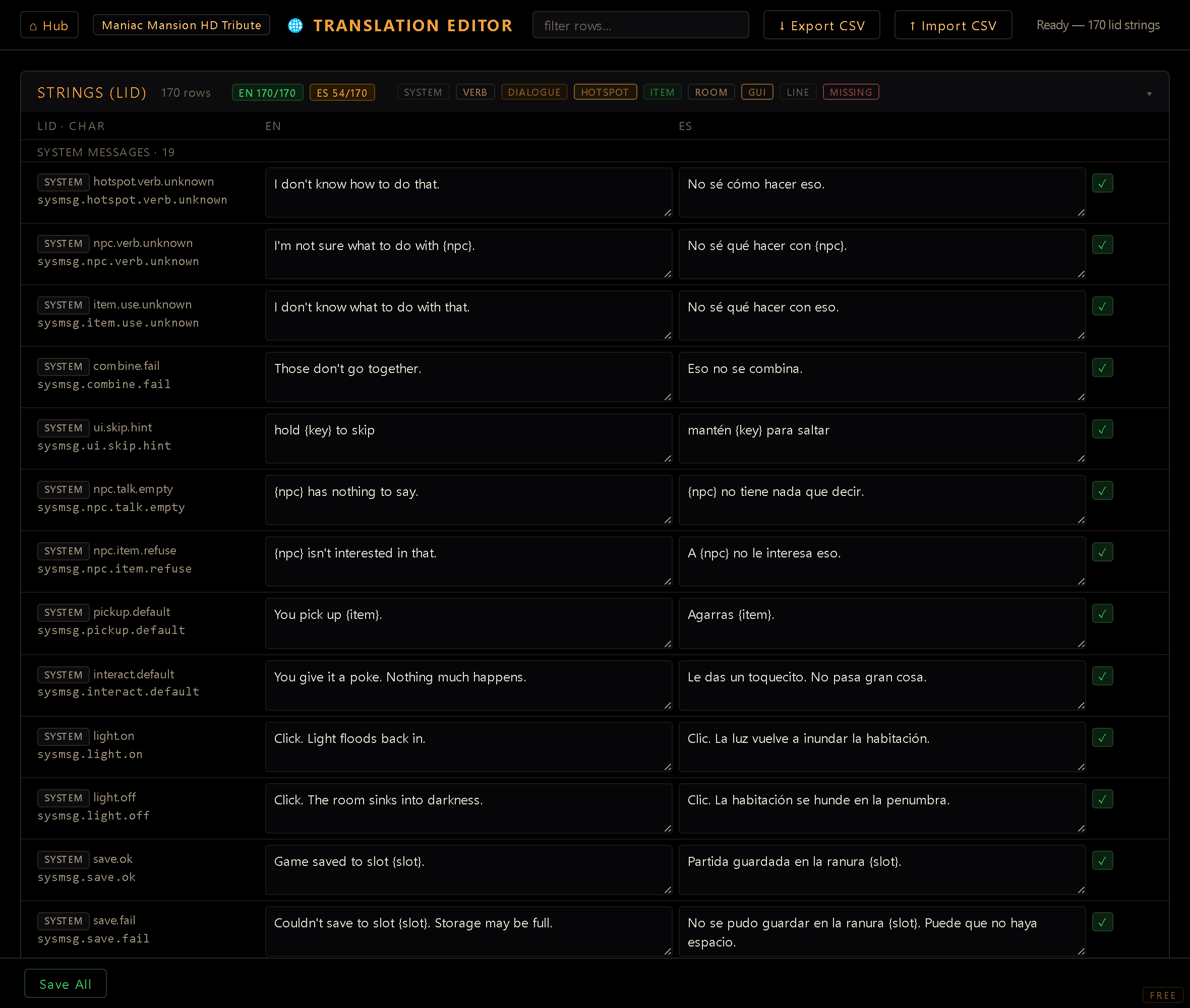
One catalog, grouped by category#
Every kind of text lives in a single collapsible section, Textos (LID), with a row count, an unsaved flag and its own Save Strings button; a sticky Save All bar collects every pending change. Each row is addressed by a stable lid, and rows are grouped by category so you can work through one kind of text at a time:
- System messages: the engine's own player-facing lines (a save that didn't fit, a damaged
save, a door that wouldn't open…). Listed from the start, before you've customized any. A message
you gave a single character its own voice for (the Reactions Editor's per-character scope)
gets its own row here, shown with that character, so
alex · pickup.defaultsits next to the genericpickup.defaultand translates on its own. - Verbs: the verb labels (look, use, take…). Only the labels translate; the verb IDs stay English (see the note below).
- Dialogues: your dialog trees: both what a character says and the choices the player picks from.
- Hotspots · Items · Rooms: the names a player reads on screen, plus room descriptions, each shown with the room or item it belongs to. Listed from the start too, read straight out of your rooms and items: a name is translatable the moment you've typed it in the Room or Items Editor, with no extra step to "register" it here.
- GUI: the text on your interface widgets.
- Achievements: the name and description of every achievement, each shown with the achievement it belongs to. Written in the Achievements Editor and translated here.
- Lines: spoken lines addressed by their own lid, including the ones written into hotspot
reactions, with the speaking character shown. One
lidkeys the on-screen line, its voice clip, and its translations, so aSAY:#lidresolves to the right text and audio per language. This is also where a voiced line's words are edited. A voice line's id in the Voice Editor is its lid, so the two are the same record: that editor shows the text read-only and this one owns it. Retyping a line here is what thetools/voicegen/pipeline will bake on the next run, so a line already voiced goes stale rather than silently keeping the old audio.
The text of the game's built-in menus (Options, Save/Load, the quit confirmation, the inventory popup and the pause menu) is listed from the start too, translatable with no extra step, even in your project's default language: these screens ship with the engine, so there is no project file to edit, and an override you type here always wins. That covers every word those menus draw: the button and title labels, the hint inside the save-name field, and the Empty and Incompatible that a save slot shows. The category chips in the section header double as filters: click one to show only that kind of row.
Filtering and CSV round-trip#
- Filter rows: the search box at the top narrows the grid to matching rows, handy in a big project. The category chips and the coverage badges in the section header double as filters too: click a chip to show only that kind of row, or click a coverage badge to show only rows missing that language, so you can knock out one language's gaps at a time.
- Export CSV / Import CSV: round-trip the whole table through a spreadsheet. Export hands a translator a clean file with one column per project locale; importing the filled-in CSV merges the translations back. This is the recommended flow when translation happens outside the team. A cell the CSV leaves out (a row that ends early, the way some spreadsheets save it) keeps the text you already had; only a cell that's there and empty clears it.
Where it saves#
Save Strings (or Save All) writes the whole grid to one place: the project's strings.json
catalog. Verb labels, dialog lines, names and reaction text all land in the same file, keyed by
lid; there's no second destination to keep in sync.
- A row left at its default writes nothing. The catalog only grows for text you actually
translated or customized. That's what keeps system messages (keyed
sysmsg.<id>) and the built-in menus on the engine's shipped wording for a language until you decide otherwise. You can also author the base text for system messages from the Reactions Editor's ⚙ System messages button: both write to the same lid. - Names and room descriptions are an overlay. The name you authored stays in its room or item file as the default-locale source and the fallback; the catalog carries the other languages under a lid derived from the resource's address, not its text. Re-wording a name in the default locale therefore keeps its existing translations. Because of that, the default-locale cell for these overlay rows (names, dialog text, project GUI text, hotspot reactions) shows up read-only here (dashed border, tooltip explaining why), since editing it in the table wouldn't change anything at runtime; go edit the source file instead. Every other row (SAY lines, system messages, verb labels, engine GUI text, achievements) stays editable.
- Verb labels are per project. Translating them doesn't reach into anything shared, so two projects can label the same verb differently.
- Saving keeps what you typed. Anything you edit while a save is running stays marked unsaved for the next Save. If another editor wrote to the catalog since this tab opened it, Save reloads it with their changes, puts yours back on top (still unsaved) and asks you to save again. If the editor's server can't be reached, your rows simply stay unsaved.
Verb IDs are fixed and English. You translate the verb label a player sees, never the verb ID (
look,use,give…). Those are the keys the interaction system and everyhotspot.reactions[verb]rely on. The same holds for any ID elsewhere: translate the display text, not the key.Translations are content: commit them. They live on disk in
strings.json, with no undo across a reload. Commit after a substantial pass so Git is your safety net.