Task Board#
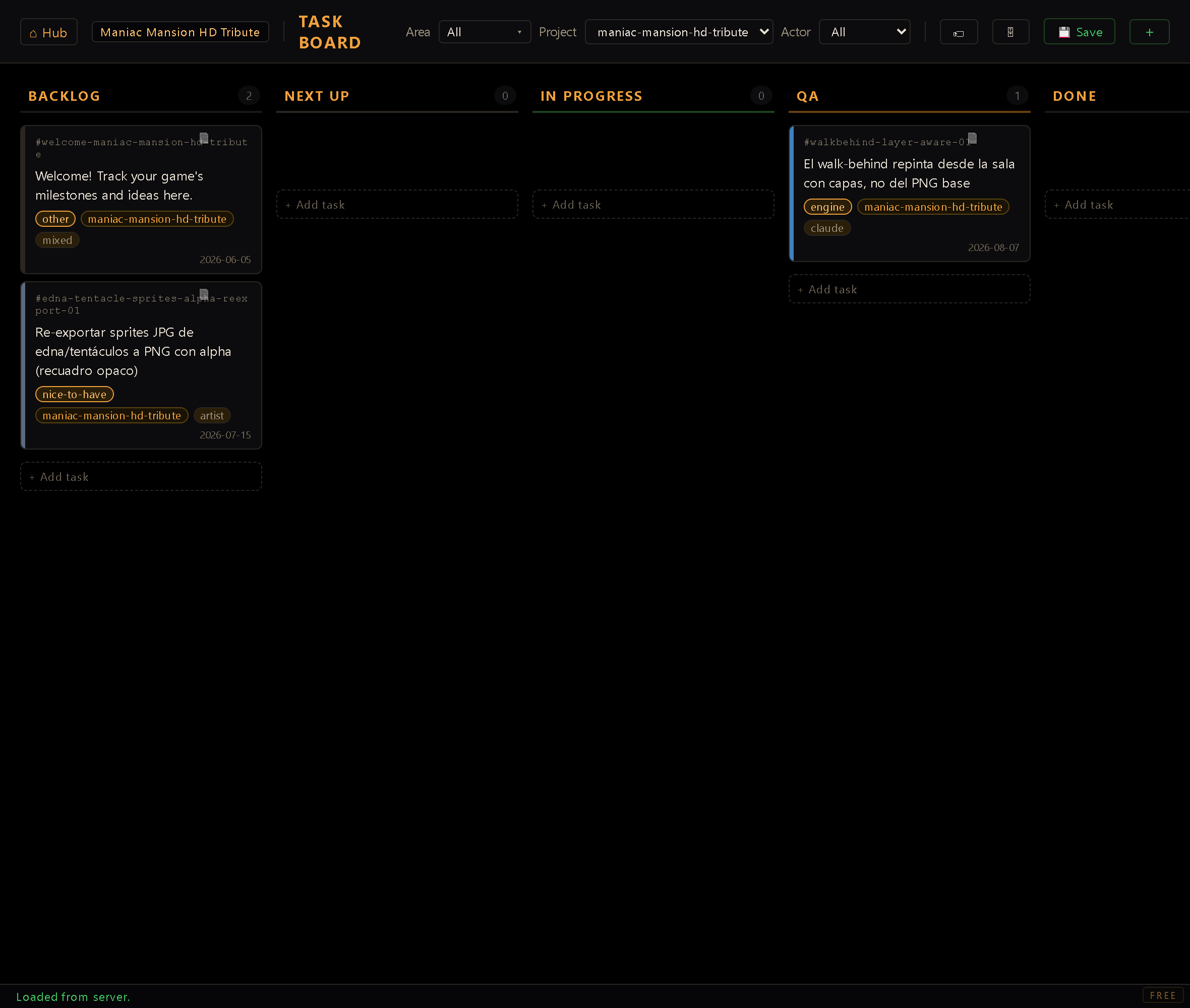
The Task Board is different from every other tool in this documentation set: it doesn't author game content at all. There's no room, sprite, dialog, or sound file on the other end of it. It's a kanban board for tracking work on the engine and its games, the same kind of backlog a small studio would keep in a project-management app, except it's a plain HTML page served by the dev server and saved to a JSON file in the repo.
You reach it from the Hub, but note the Hub lists it with no project editor slot attached
(editor: null in the Hub's tool registry). It isn't opened "for" a project the way the Room
Editor or Character Editor are. That's the first hint of its most important structural quirk.
One board for the whole workspace#
Every other editor in this suite reads and writes files under projects/<id>/…, scoped to
whichever project is active. The Task Board does not. It reads and writes a single file at the
repo root, tasks.json, shared by every project in the workspace. There is no
per-project board file, and switching the Hub's active project never changes which file the
board loads.
Cards can carry an optional project tag, and the board slices the shared file by that tag
for convenience, but underneath, backlog items for the engine itself, for Project A, and for
Project B all live in the same columns of the same file. A card with no project tag is
"generic" (untagged, engine-level, or workspace-wide work); the Project filter's default
option is literally labelled "Generic Tasks" and shows only untagged cards. Selecting a project
in that filter shows only cards tagged with that project's id, never a mix.
The Hub honors this when a project is deleted: deleting a project doesn't touch a per-project
board file (there isn't one), but it does sweep the shared tasks.json and remove every card
tagged with that project's id, across all columns. A freshly-created project seeds a single
"Welcome" card into the shared board, tagged with its own id, rather than getting its own board
file.
The very first time you open the board (before you've saved anything of your own) it shows a set of example cards spread across the columns, just to illustrate what a populated board looks like. Save any change and those examples are replaced by your real board going forward.
Card anatomy#
A card is a small record:
- id: stable identifier. Auto-derived from the description's first words if left blank
when creating a card (lowercase, hyphenated, capped at 20 characters), or typed by hand
(sanitized to letters/digits/
-/_, no length cap). Guaranteed unique across the whole board: a collision gets a-2,-3, … suffix. Once a card exists, its id is fixed: the edit modal shows it read-only, because renaming would orphan a spec file that references it by that id (see below) and drop the connection silently. - text: the card's description. Kept short in practice (the project convention is roughly 10-12 words), with any longer detail living in a separate spec doc rather than in the card itself. The UI doesn't enforce a length limit, this is a team habit.
- area: where the work lives:
engine,editor,distribution,godot-port,licensing,website,workflow,infra,content,business,other. Drives the card's left-edge color stripe and the header's area filter. You can add your own (see Areas and actors below). Older boards may still show ad-hoc values on old cards; they keep working. - sub: which part of that area, and optional: empty is a normal answer. The picker only
offers the current area's list, so changing the area re-populates it and drops a value the new
area doesn't own. Only the four biggest areas ship a vocabulary (
editor,distribution,engine,godot-port); for the rest the field doesn't appear at all. - priority: when:
blocker,high,normal(the default),low,nice-to-have,parked. It colors a chip on the card and drives the header's priority chips;normaldeliberately draws no chip, since a badge on every card is noise rather than signal. It does not reorder a column: the order you drag cards into is yours. Note this is priority, not severity: how bad a bug is belongs in its spec, next to the finding.parkedis for a whole lane you are keeping out of the next releases: the board hides those cards unless you press the parked chip, and they keep their column, so bringing the lane back is one field change. - version: the release a card shipped in. Read-only: the release cut stamps it, because the version a card ships in isn't knowable while the card is still open.
- actor: who the work is for.
developer,adminandmixedcome with the board, and you can add your own here too. - project: optional project-id tag (see above); absent means generic/untagged.
- created: a date stamp shown on the card face.
- notes: free-text detail, used as a fallback when no spec file exists for the card (see below).
- branch: an optional git branch name, rendered on the card if present.
There's no explicit status field in the data. A card's status is implicit in which column
array it lives inside: tasks.json is shaped as one array per column (backlog, next,
inprogress, qa, done, plus archived, which is a deliberate off-board list with no
column of its own, reached through the Archived drawer below, never by dragging), not a flat
list of cards each carrying a status string. Alongside those arrays the file keeps a small
settings block, which is where the areas and actors you added yourself are stored. That's what
lets them outlive the last card that used them.
Columns and the workflow#
The board renders five columns left to right: BACKLOG, NEXT UP, IN PROGRESS, QA,
DONE. There is deliberately no sixth column for archived (archived cards live entirely
off the board so the attic never crowds the in-progress flow), but they aren't lost: a dedicated
Archived drawer (below) views and restores them.
Moving a card between columns is drag-and-drop, plain and simple: the UI does not enforce any ordering or gate on which column a card may move to or from. You can drag a card straight from BACKLOG to DONE if you want; nothing stops you. The workflow discipline layered on top (QA is a human approval gate, cards move to QA on handoff but only get promoted QA → DONE with explicit sign-off, no self-approval) is a team convention, not something the tool itself checks or blocks. The board is a to-do list with drag-and-drop, not a state machine.
Within a column, dragging a card and dropping it next to another reorders the list; dropping onto a different column's body moves it there (inserted at the drop position, or appended to the end if dropped on empty space).
Moving several cards at once#
Click a card's text to select it (the card picks up an accent edge) and click again to deselect. Then drag any selected card by its text and the whole selection travels together, the drag ghost carrying a count of how many are coming with it. They land in the destination column keeping the order they had in the one they left, and the selection empties itself once you drop.
The selection lives in one column at a time: select a card in a different column and the previous selection is replaced rather than added to. That's what keeps a group drag unambiguous: every card in the group came from the same place, so "keep their relative order" always means something.
Archiving: the off-board attic#
Some cards are done with but not worth deleting: a shipped experiment, a superseded idea, a finished chunk of work you want out of sight without losing the record. Those go to the archive, which is intentionally not a column: archived cards live off the board entirely so the working columns stay focused on live work.
A card is archived from its edit modal: the column selector gains an ARCHIVED entry (only when editing an existing card; you can't create a card straight into the archive). Picking it stamps the card as closed (a completion date and a closed-reason note) and moves it off the board.
The header's 🗄 button, icon only, with the live archived count in its tooltip ("Archived · N tasks"), opens the Archived drawer: a read-only, searchable list of every archived card. The search box filters live across a card's id, text, area, sub-area, version and closed-reason. Each row shows the card's id, text, area/sub-area, version, completion date, and reason, with a per-card Restore button; a Restore to column dropdown at the top of the drawer (default BACKLOG) chooses where a restored card lands.
The drawer also carries the Version filter, and this is its natural home rather than the
header's: the release cut stamps a card's version and archives it in the same move, so a card
carrying a version is, by construction, in the attic. It only appears once something is
actually stamped; a dropdown with one option would promise a filter that doesn't filter. Restoring moves the card back onto the board
into the chosen column and sheds its archive bookkeeping, so it rejoins the flow as an ordinary
card. The archived list is ensured on load and round-trips untouched through save whether or
not you open the drawer.
Archiving in bulk#
Clicking a column's card count turns it into a select-all / deselect-all toggle for every card currently visible in that column (selection is single-column: picking cards elsewhere clears it). With a selection sitting in DONE, a header button, 🗄 Archive (N), appears; clicking it archives the whole selection at once, each card stamped with the same completion date and closed-reason as the one-at-a-time flow above.
Filtering#
The header has five filters that combine (AND logic between filters):
- Area: a multi-select checkbox dropdown (OR logic between the checked areas): check
none for "All", or check specific areas to show only matching cards. A "Select all" row
toggles every known area at once. The dropdown includes areas seeded from a known-areas list
even if zero cards currently use them (so a category stays visible and choosable even when
empty). Sub-areas are nested here rather than living in a filter of their own: check an
area and its sub-areas appear indented right below it. They're scoped (checking
editor/roomnarrows editor cards only and never hides an engine card) and unchecking the area drops its sub-areas with it, so nothing goes on filtering from a control you can't see. - Project: a dropdown seeded from the project registry (so every existing project appears even with zero tagged cards) plus any ad-hoc project tags found on cards. Defaults to whichever project is active in the Hub when you open the board (falling back to "Generic Tasks" if the active project is one of a couple of legacy/general-purpose projects, or if the Hub connection can't be reached).
- Actor: All, or any one actor: the three the board ships with plus any you've added yourself. Remove a custom actor you were filtering by and the filter falls back to All rather than showing you an empty board for a value that no longer exists.
- Priority: a row of toggle chips rather than a dropdown; none pressed means All, the same
convention the area panel uses. A card with no priority counts as
normal, so older cards don't vanish the moment you click that chip. The one exception isparked: with no chip pressed those cards stay hidden, and pressing parked (alone or with others) shows them. - Version: All, or one of the versions actually stamped on cards. There's nothing to seed: what the board carries is the list.
Filters only affect what's displayed and don't alter the saved data.
Areas, sub-areas and actors#
The 🏷 button in the header opens a small manager for the three taxonomies. Areas and actors each get a list showing everything currently available: the ones that ship with the board are marked built-in, and any that cards actually use carry a count, so you can see at a glance what's live and what's leftover.
Adding one is a text field: the name is normalized for you (lowercased, spaces turned into hyphens), and the modal refuses a blank or a duplicate with the reason shown inline rather than silently doing nothing.
Every row, built-ins included, carries Rename and Delete, each stacked as its own nested modal over the manager:
- Rename relabels every card carrying that tag, archived cards included. If the name you
type already exists, that's treated as a merge, not an error, exactly what you want for
folding near-duplicates together (
ENGINE/engine,dev/developer), and it always says how many cards are about to move before it touches anything. - Delete only removes the tag; the cards themselves are never touched and simply lose it. It never cascades, and the confirmation only appears at all when cards would actually lose the tag: confirming a no-op teaches you to click without reading. A built-in can't be struck from the board's fixed vocabulary (that list is code), so deleting one instead remembers your choice as hidden; re-adding the same name later lifts the hide rather than creating a duplicate.
Sub-areas get their own section between the two, because they hang off an area rather than standing on their own: pick the area from a dropdown and you get that area's list, with the same add field and the same Delete semantics (the label comes off the cards, the cards stay; a built-in is remembered as hidden). There's no Rename here: sub-areas are new enough that there's nothing to rename yet.
Your additions are saved with the board rather than derived from the cards, so an area or actor you created stays available even when no card is currently tagged with it; you can set up a taxonomy before there's any work to file under it.
Creating, editing, and deleting a card#
Both creating and editing a card open the same modal. A recent change replaced an older raw-text edit path with this shared form (the create-modal-as-editor pattern). The form exposes: task description (textarea), id (editable only when creating, auto-suggested from the description as you type, overridable; shown read-only once the card exists), column, area, actor, and project. Creating a card can be started from the header's + button (lands in Backlog) or from a column's own + Add task button (lands in that column); editing is via the pencil icon that appears on hover over a card.
Deleting a card is the × button on hover, and it always asks for confirmation first (a modal dialog describing the card's text and warning the action can't be undone) before the card is actually removed. This is enforced by the tool itself, not just a convention: there's no direct-delete path in the UI.
Saving is automatic: any change (create, edit, delete, drag) marks the board unsaved and
triggers a debounced auto-save (a few hundred milliseconds after the last change, so a burst of
edits or a drag chain coalesces into one write) via POST /save-tasks, which overwrites the
shared tasks.json at the repo root. A manual Save button in the header does the same
write immediately. A toast confirms each save (or reports an error, e.g. if the dev server
isn't running); the page title also gets a ● marker while a change is unsaved, and the
browser will warn before closing a tab with unsaved changes.
Specs: the long-form detail a card doesn't hold#
Card text is meant to stay short; the detail for an active card is expected to live in a
separate markdown spec file, conventionally at docs/specs/<card-id>.md. The board surfaces
this directly: each card has a small document icon (visible faintly at rest, fully on hover, so
a card with detail worth reading is discoverable at a glance during QA review) that opens a
read-only modal rendering that spec file as markdown, fetched from /docs/specs/<id>.md. If no
spec file exists for the card's id, the modal falls back to showing the card's own notes
field instead (labelled as such); if there's neither a spec nor notes, it says so plainly. This
is why a card's id is locked after creation: the spec-file link is by convention (same id,
predictable path), not a stored reference, so renaming an id would silently break the
connection to its spec.
Workflow#
- Open the Task Board from the Hub. It defaults to showing the Hub's currently active project's cards (or "Generic Tasks" if that project is generic/unset).
- Use the Area / Project / Actor filters to narrow the view.
- Add a card via the header + or a column's + Add task, filling in description, area, actor, and (optionally) a project tag.
- Drag cards across columns as work progresses; reorder within a column by dropping next to another card.
- Click a card's spec icon to read (or realize there isn't yet) the long-form detail behind a short card description.
- Edit a card's fields via its pencil icon when priorities or details change; delete it via its × icon, confirming when prompted.
- Everything saves automatically as you go; the header's Save button and the toast in the corner are just an explicit, immediate version of the same write.
The board is shared, not per-project: that's the fact to know before anything else. Every other tool in this suite reads and writes inside
projects/<id>/; the Task Board reads and writes onetasks.jsonat the repo root for the entire workspace, and the Project filter is a view over tags on that single file, not a switch between separate files. Deleting a project cascades into this shared file (stripping its tagged cards) precisely because there's no separate per-project board to simply discard.