Game Structure Designer#
The Game Structure Designer organizes a game into an ordered top-to-bottom sequence of
blocks (cinematics, playable chapters, and menu screens) and saves it to the project's
structure.json. The file is entirely optional: with no structure.json (or with its
enabled flag off), the game boots the classic way, straight into initialPlayer's room, and
this tool is only useful for organizing dev checkpoints. Turn the boot toggle on and the
structure takes over the flow instead, playing blocks in order from the first one.
You reach it from the Hub (dev server running). The toolbar's drive boot switch maps
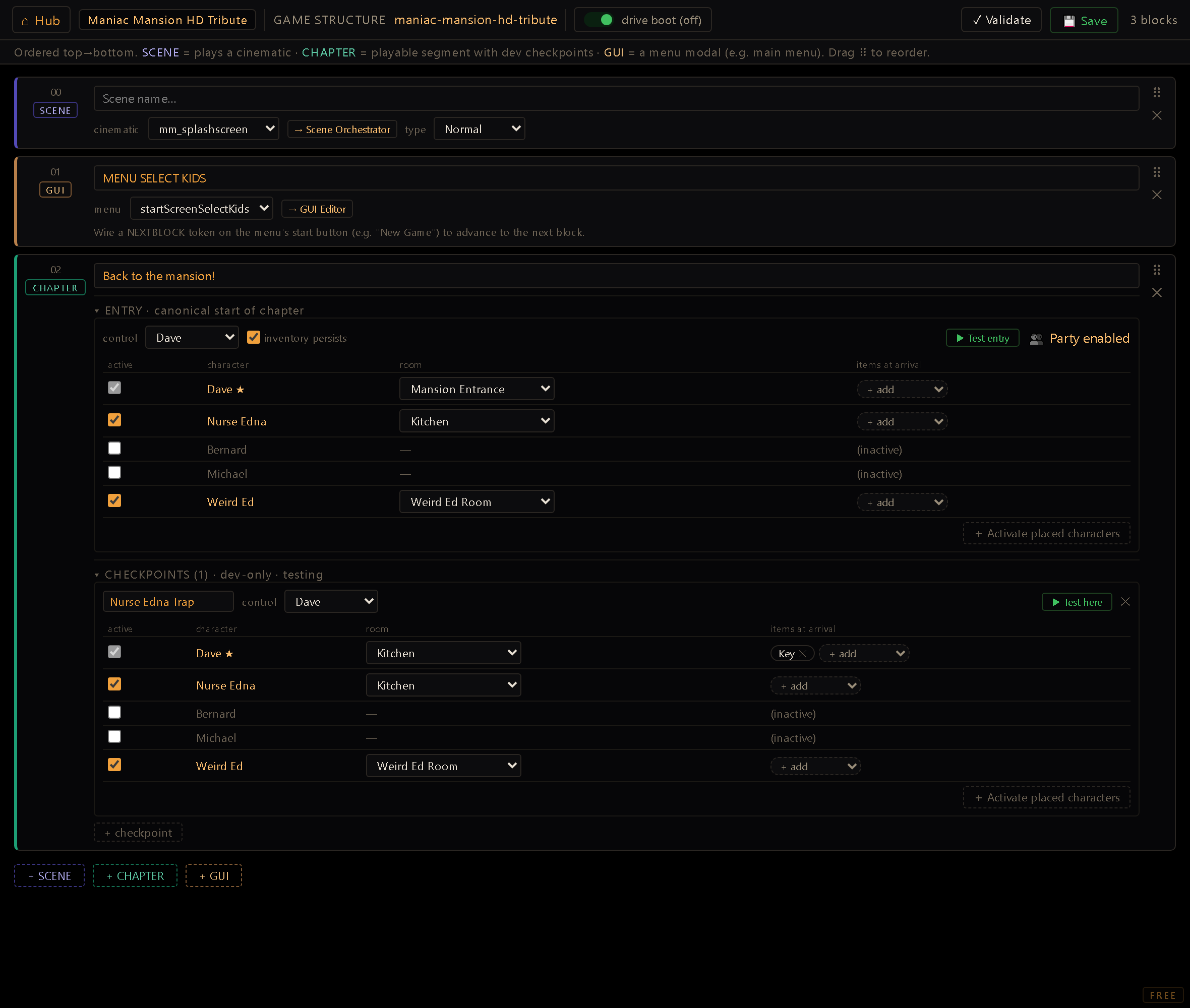
directly to structure.enabled; the pane below lists every block as a card, in play order.
Anatomy of a block#
Every block has an id, a type, and a name. The three types:
- scene: plays a cinematic. Its scene field is picked from the project's scenes and links out to the Scene Orchestrator. The runner starts the scene and waits; when the scene ends, the flow advances to the next block automatically. A scene also carries a scene type (Normal, Intro, or Credits) so the validator (below) can confirm the game actually opens and closes properly; it has no effect on playback.
- gui: opens a menu modal (the title screen, a chapter-select menu, anything built as a
GUI). Its gui field picks from the engine's default openable modals (
inventory,save,options) plus every modal already defined in the project's ownguis.json, and links out to the GUI Editor. Unlike a scene, a GUI block never advances on its own: the menu's own button (e.g. "New Game") has to fire aNEXTBLOCKeffect token to move the flow forward. Forget to wire it and the player is stuck at that menu forever; nothing else advances a GUI block. - chapter: a playable segment. It has a canonical entry (below), an inventoryPersists toggle, and a list of dev-only checkpoints.
Blocks are reordered by dragging their ⠿ handle, and deleted with a confirm prompt.
Chapter entry vs. checkpoints: the load-bearing distinction#
A chapter block carries two things that look identical but mean very different things:
- Entry (
block.entry) is the chapter's real, canonical start: the state the structure runner applies when the flow reaches this block during normal play (or a structure-driven boot). There's exactly one per chapter. - Checkpoints (
block.checkpoints) are an open-ended list of dev-only shortcuts, each one a snapshot you can jump into to test some mid-chapter state without replaying everything before it. They never run during normal play; they only exist for the?cp=dev launch (below).
Both are shaped identically ({ control, actors }) and share the same actor table UI, but only
entry is what a real player ever experiences.
Because the entry replaces the bag wholesale, it, not the item editor, is where a chapter-driven game's starting inventory lives. So when you create the first chapter, its entry arrives pre-filled with every item the Items Editor marked with a Starting owner; it's a starting point you can edit freely. Only the first chapter (the one a new game walks into) and only on creation: a later chapter handing out the starting items again would be a bug, and an entry you already authored is yours. Dev checkpoints are never seeded.
The {control, actors} shape#
- control: which character the player is playing at this point; the runner spawns this character into its room and makes it the active player.
- actors: one row per known character, each with:
- active: whether the character exists in the world at all at this point (the control character is always active, and the checkbox is locked on for it).
- room: which room the character is placed in (only settable while active). The chapter decides the room; where in that room the character stands, and which way it faces, still come from its Room Editor placement. A character with no authored facing looks down.
- items: the character's starting inventory at this point, as item chips. Inactive characters get an empty inventory and no placement: they simply aren't in the world yet.
The cast here defines the world; a Room Editor placement alone doesn't. Once the structure drives boot, a chapter's actor table is the authority on who exists: a character absent from it (or left inactive) simply isn't in the world when the chapter runs, even if you placed them in that room in the Room Editor. The placement and the timeline are decoupled on purpose (a chapter decides when a character exists), but the trap is that a Room-Editor-only placement silently does nothing here.
The + Activate placed characters button on each actor table (the entry's and every checkpoint's) bridges that gap in one click: it pulls in every character that has a Room Editor placement but is inactive in this cast, activating them and seeding each one's room from that placement. It's additive and per-cast: your curated actors are never overwritten, and nothing leaks into the other chapters.
When party mode is enabled, a 👥 badge appears on a chapter's entry as a reminder: the
committed party members show up in a room through its partyAnchors regardless of this cast, so
an actor row you left inactive here can still appear in-game. That's the party layer doing its
job, not the cast misbehaving.
inventoryPersists#
A chapter-level toggle, separate from the entry/checkpoint actor tables. When on, entering the chapter keeps the player's current inventory (the real, continuous flow across acts) instead of resetting it to whatever items the entry's actor table authored. It only affects the entry path (normal/structure-driven play); a dev checkpoint launch always applies its own authored items regardless of this flag.
Dev-testing workflow#
Two buttons launch the game straight into a specific state, against the active project
(?p=<projectId> is appended automatically so the launch can't silently boot the wrong project).
In the desktop app the game opens in its own native window, separate from the editor, so you can
play the test and keep working in the Designer at the same time; in the browser version it opens
in a new tab instead. Launching again while a test window is already open closes it and reopens
it fresh with the new state.
- ▶ Test entry (on the chapter's entry section) saves first, then opens
/index.html?p=<id>&enter=<blockId>. This runs the structure flow starting at that block, useful for checking a chapter's real entry state, or a scene/gui block in context. - ▶ Test here (on a checkpoint) saves first, then opens
/index.html?p=<id>&cp=<blockId>:<checkpointId>. This resolves just that one checkpoint and drops the player straight into it, without running the structure flow.
Both URL parameters are handled by shell/structure_runner.js and work regardless of whether
structure.enabled is on: they're dev overrides that take priority over both the classic boot
and a structure-driven boot. A ?cp= launch also aligns the runner's block cursor to the
checkpoint's chapter, so a NEXTCHAPTER fired afterward still advances correctly. Both buttons
refuse to launch if the control character has no room set, since the runtime resolver would
otherwise throw.
Boot toggle#
The drive boot switch in the toolbar is structure.enabled. When on (and at least one block
exists), shell/main.js hands the entire boot sequence to the structure runner, which enters
block 0 and plays the sequence top-to-bottom: scenes advance on scene-end, chapters apply their
canonical entry and wait for a NEXTCHAPTER/NEXTBLOCK token, and GUI blocks wait for the menu's
own button to fire NEXTBLOCK. When off, boot is classic (straight into initialPlayer's room)
and the structure (if any) is only reachable through the dev ?cp=/?enter= overrides above.
This is a real, live switch: it's read at boot (structureDriving() gates whether
enterStructureBlock() runs) and by every NEXTCHAPTER/NEXTBLOCK/PARTYCOMMIT token, not a
stored-but-unused flag.
When the structure runs out#
The last block finishing used to be the end of the engine's involvement, literally a no-op, so a game whose last block was the end credits ended on a black screen: no scene, no menu, no room.
Every scene block now carries a when it finishes option, shown on the last block (the only place it can matter):
- restart the loop: wipe the playthrough and re-enter block 0. This is the default for a scene
tagged End credits, so the common case needs no authoring at all. The wipe (
RESETGAME) clears progress (flags, inventories, party, puzzle state) and keeps the player's achievements, along with settings and saved games. - stay there: the old behaviour. Validate flags it, because the player is left staring at a
black screen unless the scene itself holds its last frame (
endMode: hold).
For anything conditional, author it instead: a GOTOBLOCK:<block> token in the scene's onEnd
overrides the option entirely, and since endMode: hold defers onEnd to the player's skip, it
fires exactly when they decide to leave. That's how you branch (all achievements unlocked → a
bonus block, otherwise → the title screen) or send the player to a scores or evaluation screen
first, with RESETGAME wherever you want the slate wiped.
Validate#
The ✓ Validate button checks the whole structure in one pass and opens a report with two parts: a summary (drive boot state, block/scene/chapter counts, the resolved entry room, how many of the project's GUIs are actually wired into the structure, which scene is the intro and which is the credits, and the checkpoint count per chapter) and a list of warnings, each one flagged either 🔴 (an error, the structure can't run) or 🟠 (a heads-up worth checking). It flags things like: no blocks at all, no chapter block, a first chapter with no entry room, no scene marked Intro, no scene marked Credits, more than one of either, a scene or GUI block with an empty or broken reference, and a chapter with no control character set. It checks every checkpoint in every chapter, not just the chapter's canonical entry. A broken control character, cast member, or active-actor room on any checkpoint gets flagged (repeats of the same broken reference across many checkpoints are grouped into one warning), and the summary gets a "References: N broken / M checked" row for it. Run it any time you want a sanity check before flipping drive boot on or handing the project off.
Workflow#
- + SCENE / + CHAPTER / + GUI at the bottom of the pane to append a block.
- Name each block, then fill its type-specific field: a scene id, a gui id, or a chapter's entry.
- For a chapter, set the control character and, in the entry's actor table, mark who's active, place each active character's room, and give them starting items.
- Decide inventory persists for the chapter if it isn't the first one.
- Add dev checkpoints as needed for mid-chapter testing; use ▶ Test here / ▶ Test entry to jump straight into any of them.
- Drag blocks by their ⠿ handle to fix the play order.
- Run ✓ Validate to catch missing pieces (no intro/credits scene, an unset entry room, a dangling reference) before you rely on the structure.
- Flip drive boot on once the sequence is ready to actually govern the game's boot.
- Save to write
structure.json. If someone else saved the structure since you loaded it, Save shows a conflict prompt instead: keep your local edits or overwrite theirs, never resolved automatically. A server that can't be reached surfaces an error rather than leaving Save stuck.
A GUI block only ever advances on
NEXTBLOCK. Nothing else moves the flow past it: not a timer, not a click anywhere else on the screen. If a title screen or chapter-select menu is authored as a GUI block and its "start" button doesn't fireNEXTBLOCK, the player reaches that menu and the game simply stops progressing there, with no error to point at the mistake. By the same logic the menu can't be dismissed while the structure is driving: pressing escape won't close it, and a button on it wired toCLOSEGUIdoes nothing. There's no room behind a GUI block to fall back to, so closing it would strand the player on an empty screen with no way out. A submenu opened over the block (options, say) closes normally: it just returns to the flow menu rather than to nothing. Practical consequence: a "Back" button belongs on the submenu, never on the flow menu itself. The companion gotcha is the entry/checkpoint distinction above: onlyblock.entryis what a real playthrough uses; a checkpoint can look identical and still never run outside a?cp=dev launch.